
• Skip to primary navigation
  • Skip to main content
  • Skip to primary sidebar
SimplifyEm Property Management Software Logo

510-790-9066
510-790-9066
》Sign In
  • Features
    • Accounting Software
    • Reconciliation
    • Tenant Screening
    • 1099 E-filing
    • Reports
    • Communication Center
    • Integrated Rental Application
    • Rental Listing
    • Online Rent Payments
    • Tenant Portal
    • AI in Property Management
  • Property Management
    • Online Rent Payments
    • Tenant Screening
    • Rental Listings
    • SimplifyEm CRM
    • FAQ
  • Rental Forms
    • Lease Agreement
    • Rental Application
    • Notice to Vacate
    • Notice to Quit
    • Lease Termination
    • Notice to Pay Rent
    • Rental Inspection
    • Eviction Notice
  • Pricing
  • Reviews
  • Schedule Demo
  • FREE TRIAL!
  • 》​Sign​ In

FAQ > Managing Tenant and Lease Agreement Information

How can I add new tenants to my properties?

Before adding a new tenant to your property, it’s important to ensure that the unit is vacant. If you need help moving out a previous tenant, please refer to this link for detailed steps. Once the unit is vacant and ready for a new tenant, follow these steps to easily add the new tenant to your property:

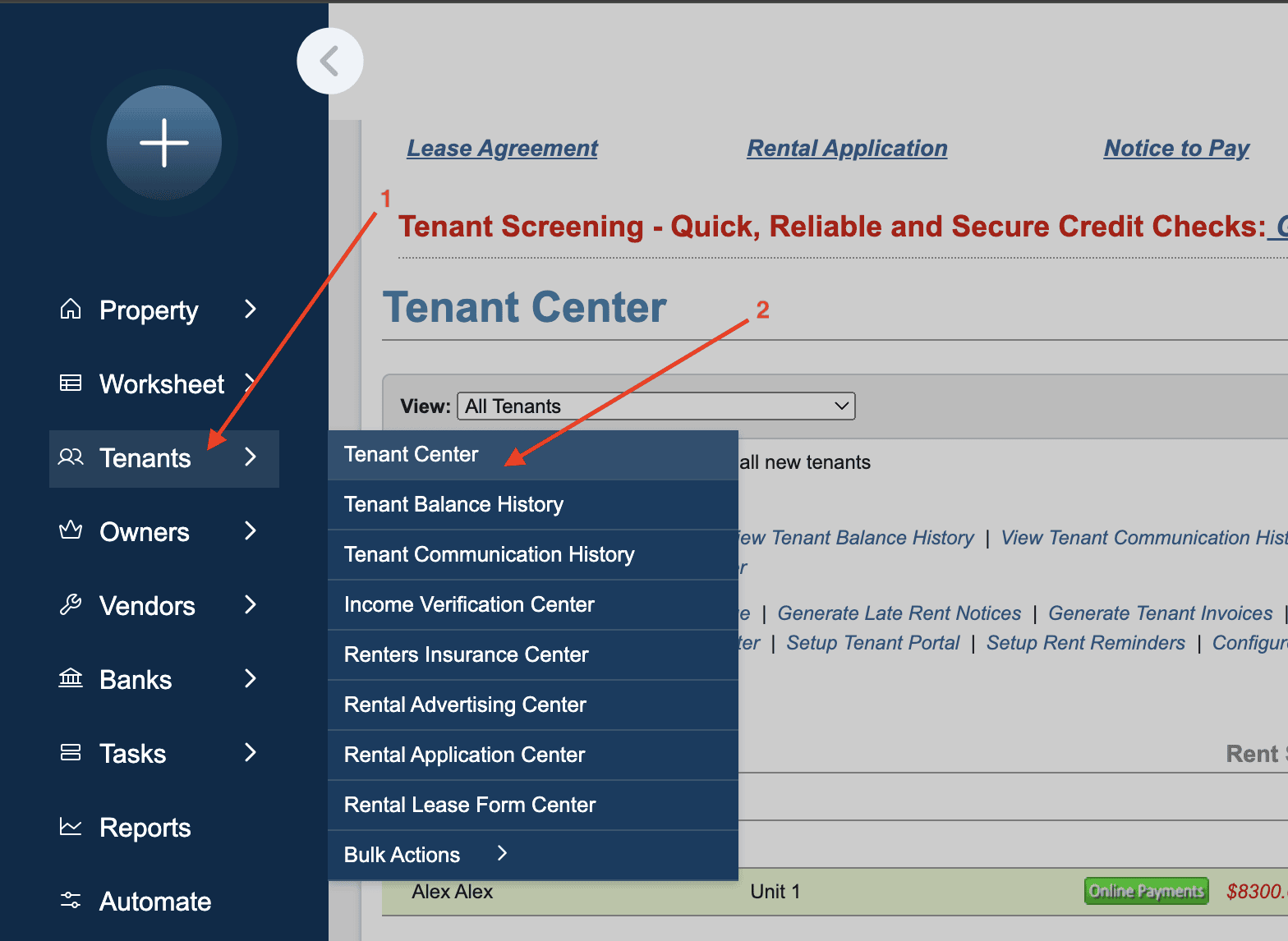
1. Navigate to the “Tenants” module on the left-hand side and go to the “Tenant Center.”
add new tenants

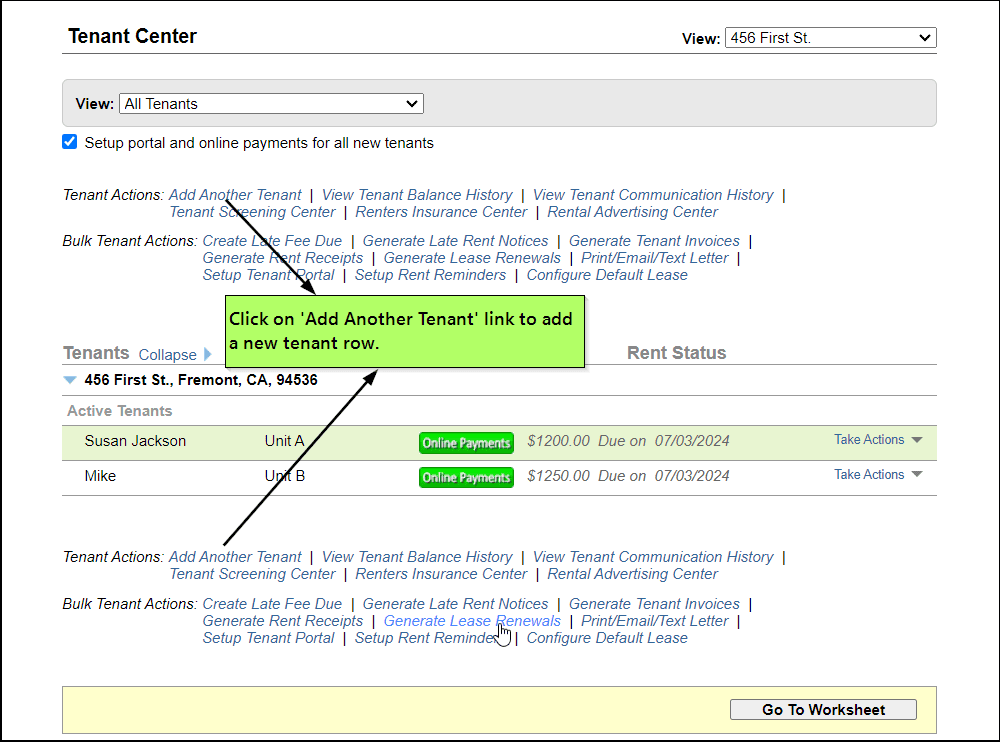
2. Select the specific property where you want to add the new tenant.

3. Click on the “Add Another Tenant” button. This action will generate a new row on the page, allowing you to input the necessary tenant information.
Landlord Software

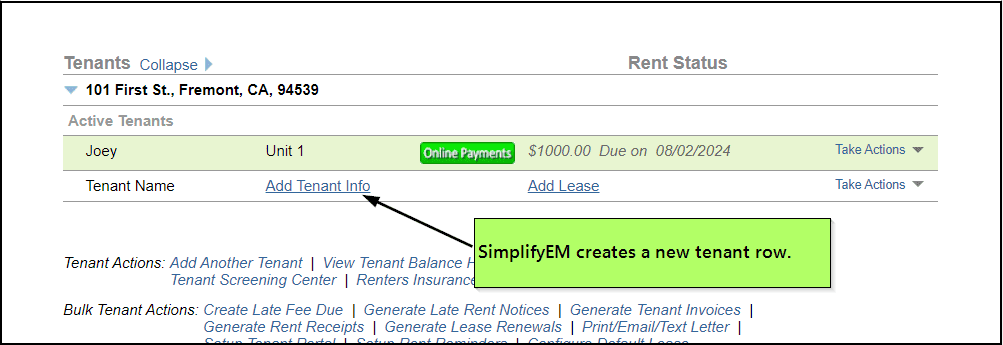
4.Next, proceed by filling in the tenant’s details, including their personal and lease information. SimplifyEm.com Property Management Software will automatically create a row in the worksheet for the new tenant, where you can input and manage their data.
Landlord Software

Important: Please note that SimplifyEm.com Property Management Software will not allow you to assign more tenants than the available number of units in a property. This safeguard ensures that you can’t over-assign units beyond their capacity, keeping tenant records accurate and aligned with the actual property layout.

By following these steps, you can easily add and manage new tenants in your properties, ensuring that all relevant details are organized and tracked within the software for efficient property management.

Primary Sidebar

SimplifyEm
Streamline Your Property Management

Schedule A FREE Demo

Table Of Contents

  • FAQ > Managing Tenant and Lease Agreement Information
  • How can I add new tenants to my properties?
  • 1. Navigate to the “Tenants” module on the left-hand side and go to the “Tenant Center.”

SimplifyEm

  • Property Management Software
  • SimplifyEm Reviews
  • About Us
  • Pricing
  • SimplifyEm CRM
  • Terms and Conditions
  • Privacy Policy
  • SimplifyEm Security

Features

  • Property Management
  • Online Rent Payments
  • Affordable Tenant Screening
  • Rental Listing
  • Request Demo
  • Accounting Software
  • Reconciliation
  • Tenant Screening
  • 1099 eFiling Feature
  • Reports
  • Communication Center
  • Integrated Rental Application
  • Rental Listing
  • Online Rent Payments
  • Tenant Portal
  • AI in Property Management

Forms

  • Lease Agreement
  • Notice To Quit
  • Notice To Pay Rent
  • Rental Application
  • Rental Inspection
  • Lease Termination
  • Eviction Notice

Resources

  • Blog
  • Property Management Companies
  • Law
  • Buzz
  • FAQ

Company

  • Contact Us
  • Support
  • Press And Media
  • Career


SimplifyEm Property Management Software Logo

Follow us

Facebook Instagram Twitter LinkedIn YouTube

Download App

Google Play App Store
SimplifyEm Google Reviews - Rated 4.8 out of 5 SimplifyEm G2 Reviews - Rated 4.7 out of 5 SimplifyEm Software Advice Reviews - Rated 4.8 out of 5 SimplifyEm Capterra Reviews - Rated 4.7 out of 5

Copyright © 2025 SimplifyEm Inc. · All rights reserved.

Get Your Lease Agreement Form in Just One Step

I am a: