
Rental Move-In and Move-Out Checklist
Build a customizable, room-by-room property inspection checklist in minutes — not just a static template.
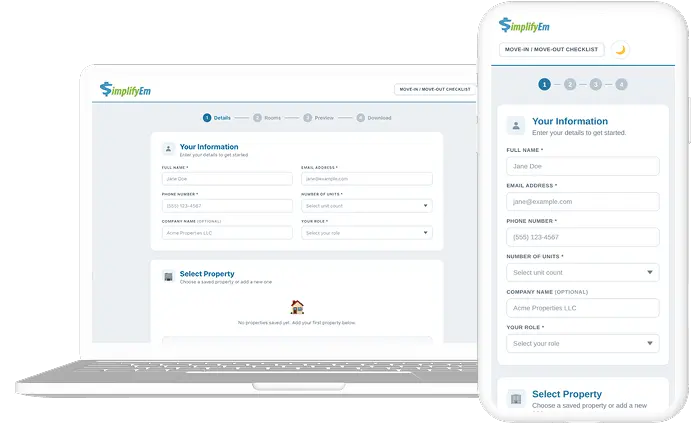
Add rooms, toggle inspection items, reorder sections with drag-and-drop, and instantly export a professional, dated PDF. Built for landlords and property managers who need more than a basic download.
Built for property managers managing rentals, and landlords with growing portfolios.
Why Property Managers Use Interactive Move-In / Move-Out Checklists
Protect Security Deposits
Document the exact condition of every room at move-in and move-out. A signed, room-by-room inspection record gives you the evidence needed to support fair security deposit deductions.
Fully Customizable Rooms
Customize for Any Property
Unlike static PDF templates, this tool lets you add or remove rooms, toggle individual inspection items on or off, and drag-and-drop sections to match the exact layout of your property.
Instant PDF Export
Reduce Tenant Disputes
A signed checklist proves both parties agreed on the property's condition. Comparing the move-in record against the move-out record eliminates guesswork and minimizes disagreements.
Ready in Minutes
What You Can Do With This Move-In / Move-Out Checklist Include?
Add and remove rooms to match your property
Drag-and-drop rooms to reorder your checklist
Add custom rooms like Patio, Storage, or Attic
Save properties and reuse checklists across units
Preview the full checklist before downloading
Toggle individual inspection items on or off
Record move-in and move-out condition separately
Export a professional, dated inspection PDF
Include tenant and landlord signature lines
Works for single-family homes and multi-unit buildings
KNOW THE DIFFERENCE
Move-In Checklist vs. Move-Out Checklist
Move-In Checklist
Move-Out Checklist
A move-in checklist captures the property's starting condition. A move-out checklist documents changes at departure. Together, they help property managers and landlords handle security deposit decisions fairly and transparently.
Fair Housing & Legal Disclaimer
SimplifyEm is committed to compliance with the Fair Housing Act and all federal, state, and local anti-discrimination laws. This Move-In / Move-Out Checklist tool and its resulting PDF documents are provided for organizational and record-keeping purposes only and do not constitute legal advice. Landlords and property managers are solely responsible for ensuring that their property inspections, security deposit withholdings, and tenant communications comply with all applicable local real estate and housing laws, which vary significantly by state and municipality. We strongly recommend consulting with qualified legal counsel regarding your specific property management and security deposit practices to ensure full legal compliance.
From Checklists to Full Rental Management
A move-in/move-out checklist helps with one step. SimplifyEm helps property managers and landlords manage the full rental workflow — applications, tenant screening, leases, rent collection, accounting, maintenance, owner reporting, and more.
Rental applications
Tenant screening
Lease tracking
Online rent collection
Maintenance tracking
Accounting & reports
Owner statements
Tenant communication
Frequently Asked Questions - FAQs
KEEP GOING
More Free Property Management Tools
Generate, calculate, and organize other parts of your rental workflow with SimplifyEm free tools.

