• Skip to primary navigation
  • Skip to main content
  • Skip to primary sidebar
SimplifyEm Property Management Software Logo

510-790-9066
510-790-9066
》Sign In
  • Features
    • Accounting Software
    • Reconciliation
    • Tenant Screening
    • 1099 E-filing
    • Reports
    • Communication Center
    • Integrated Rental Application
    • Rental Listing
    • Online Rent Payments
    • Tenant Portal
    • AI in Property Management
  • Property Management
    • Online Rent Payments
    • Tenant Screening
    • Rental Listings
    • SimplifyEm CRM
    • FAQ
  • Rental Forms
    • Lease Agreement
    • Rental Application
    • Notice to Vacate
    • Notice to Quit
    • Lease Termination
    • Notice to Pay Rent
    • Rental Inspection
    • Eviction Notice
  • Pricing
  • Reviews
  • Schedule Demo
  • FREE TRIAL!
  • 》​Sign​ In

SimplifyEm

SimplifyEm’s Complete Accounting Solution

Filed Under: Property Management Software

Transforming Property Management with Comprehensive Financial Tools

At SimplifyEm, we’re constantly evolving to meet the needs of property managers, landlords, and owners. We understand the importance of having a robust, easy-to-use accounting system that can handle the complexities of property management. That’s why we’re thrilled to introduce our new suite of accounting features, built to simplify your financial management while giving you the power to make better business decisions.

At SimplifyEm, we understand that managing the financial aspects of property management can be overwhelming, especially when dealing with multiple properties, tenants, and vendors. That’s why we are excited to introduce our next-generation accounting features designed to automate, streamline, and elevate your financial management processes.

Our new accounting suite brings together a powerful set of tools that not only simplifies your daily accounting tasks but also provides deeper insights into your business’s financial health, helping you focus more on growth and less on mundane operations.

What to Expect with SimplifyEm’s New Full Accounting Feature

  • Expanded Chart of Accounts: A Structured Framework for Financial Clarity

  • The expanded Chart of Accounts (COA) is a game-changer in how property managers and landlords can categorize and track their financial transactions. The COA is meticulously organized to ensure that every aspect of your property finances is systematically recorded.

    • Hierarchical Ledger Organization: SimplifyEm’s COA provides a detailed grouping of financial data into assets, liabilities, equity, income, and expenses, allowing for clear segmentation and categorization.
    • Customizable Accounts Creation: Users can easily create and organize new ledger accounts under specific groups, with the system automatically generating ledger codes to maintain a consistent sequence.
    • Automatic Code Generation: The system automatically assigns sequential ledger codes, making it easier to manage and expand your accounts.
    • Aligned with NARPM Standards: Our COA enhancements are designed following the best practices recommended by the National Association of Residential Property Managers (NARPM), ensuring industry-standard compliance and flexibility.
  • New Automation Saves You Time and Reduces Errors

  • We’ve integrated advanced automation into our accounting processes to reduce manual data entry and improve data accuracy across your financial records. This enhancement is not just about saving time; it’s about ensuring that your books are always balanced and up-to-date.

    • Comprehensive Opening Balance Setup: SimplifyEm allows users to set up opening balances for individual modules like tenants, vendors, banks, and security deposits before consolidating them in the Accounting Opening Balance page as per accounting books.
    • Direct Ledger Code Updates: Users have the flexibility to update or correct missing opening balance ledger codes directly in the consolidated Opening Balance, ensuring accuracy and completeness from the start.
    • Intelligent Ledger Code Management: Our automation tools ensure that ledger codes are accurately mapped and updated, with the flexibility to adjust opening balances directly in the Opening Balance UI.
    • System-Generated Entries: All accounting entries are automatically generated and updated in real-time, reflecting every transaction accurately in your ledgers.
    • Data Integrity: The system automatically matches ledger codes with transaction types, ensuring financial consistency and preventing misclassification.
  • Advanced Financial Reporting

  • SimplifyEm’s new reporting features offer a deeper level of insight into your financial data. These advanced options are designed to empower property managers with detailed, customizable financial statements.

    • True Balance Sheet Integration: Our true balance sheet gives you a complete overview of your assets, liabilities, and equity, ensuring a precise reflection of your financial health at any given point.
    • General Ledger Enhancements: A detailed general ledger that tracks every transaction with real-time running balances, helping you to drill down into specific details with ease.
    • Flexible Accounting Methods: Easily switch between accrual and cash basis reporting, allowing you to choose the most suitable method for analyzing your financial performance.
  • Powerful Accounting and Journal Entry Features

  • SimplifyEm’s journal entry module has been completely redesigned to provide you with full control over financial transactions, whether for one-time entries or recurring accounting adjustments.

    • Intuitive Interface: Select PM or owner books, choose properties, and assign ledger accounts with ease.
    • Detailed Manual Entries: Easily record and manage accounting transactions, including complex journal entries, directly within the property management accounts module.
    • Recurring and One-Time Entries: The interface supports both recurring entries for ongoing transactions and one-time entries for unique financial events.
    • Entry Management: Edit, duplicate, or delete journal entries directly from the interface.
  • Enhanced User Experience for All Accounting Levels

  • We’ve designed our accounting module with both beginners and seasoned accountants in mind:

    • Double-Click Pop-Up for Details: With a simple double-click on any transaction in the General Ledger, you can view the detailed accounting entries related to that transaction, making data validation and audit trails straightforward.
    • Ease of Use: SimplifyEm’s interface is intuitive, guiding you through each step of the accounting process, even if you’re not a financial expert.
  • Account Ledger Enhancements Based on Industry Standards

  • Our account ledger enhancements are aligned with the highest standards set by NARPM, ensuring that property managers have a clear and structured view of their financial data across multiple layers.

    • Layered Ledger View: SimplifyEm’s ledger view is organized into multiple layers, including group ledgers, individual ledgers, and sub-ledgers, providing a comprehensive breakdown of all financial transactions.
    • Real-Time Balance Updates: Running balances are instantly updated with each transaction, providing up-to-date insights into your financial standing at any moment.
    • Detailed Audit Log Trails: Every action within the ledger is tracked and logged to provide a complete audit trail, ensuring accountability and transparency in your financial processes.
  • Built-In Audit Log for Complete Transparency

  • Transparency is crucial in accounting, and SimplifyEm’s built-in audit log ensures it. Every change made to your financial records is tracked, with detailed logs that include the time of the change, what was updated, and who made the update.

    This feature provides a full history of all activities, making it easy to trace back any adjustments. Whether it’s for daily management or during an audit, the audit log helps maintain the integrity of your data and simplifies the review process. It’s a valuable tool for ensuring accuracy, accountability, and compliance.

    • Timestamps for Every Action: Each modification, no matter how small, is logged with an exact timestamp, allowing you to see when changes were made and by whom.
    • User-Specific Tracking: The audit log records the identity of the user who made any changes, ensuring that there is no ambiguity in the source of modifications.
    • Detailed Change Descriptions: For every adjustment—whether it’s a journal entry, an update to a ledger code, or a closing book action—the audit log provides a detailed description of what was changed, why it was changed, and how it impacts the financial records.
  • Enhanced Accounts Mapping UI for Income and Expenses

  • The Accounts Mapping UI is a significant enhancement that simplifies the way income and expense transaction names are linked to specific ledger codes. This feature is essential for maintaining accurate and consistent financial records.

    • Automated Pattern Matching: Automatically map transaction names to the most appropriate ledger codes.
    • Manual Mapping Adjustments: Easily override automatic mappings to refine your ledger code assignments or manually adjust mappings when necessary to ensure precise categorization.
    • Flexible Attribute Management: Easily create or modify transaction names and ensure they are properly linked to the corresponding ledger codes for accurate financial reporting.
    • Data Synchronization: Changes in ledger mappings are applied retroactively to all associated past transactions, maintaining consistency across your financial data.
  • Comprehensive Bank Ledger Mapping
  • Our bank ledger mapping feature ensures that all bank-related transactions are meticulously recorded and linked to the correct ledger codes, which is crucial for accurate bank reconciliations.

    • Mandatory Mapping: All bank accounts must be correctly linked to their respective ledger codes to ensure that financial transactions are accurately represented.
    • Integration with Bank Center: The bank ledger mapping feature integrates directly with the Bank Center, providing a unified view of all bank transactions and balances.
  • Secure and Controlled Closing Books Feature
  • The closing books feature allows property managers to lock their financial records for a specific period, ensuring no unauthorized changes can be made to closed entries.

    • Accrual and Cash Method Flexibility: SimplifyEm supports both accrual and cash basis closing, giving you the flexibility to choose the best accounting method for your needs.
    • Post-Closure Security Controls: Once the books are closed, further changes are restricted unless explicitly allowed with password protection, ensuring data integrity.
    • Clear System Prompts: Receive warnings and notifications for any attempts to modify closed entries, safeguarding your financial records from unauthorized edits.
  • Accounting Opening Date and Balance Setup for Seamless Transitions
  • Setting up your accounting opening date and balances in SimplifyEm is straightforward and designed to integrate seamlessly across all property management modules.

    • Centralized Balance Entry Page: The Opening Balance UI consolidates data from tenants, vendors, banks, and owners, providing a clear and unified view of your financial starting point.
    • Flexible Setup Options: Whether you start with the accounting opening date or set up balances individually, SimplifyEm ensures that all entries align perfectly with your financial setup.
  • Data-Driven Insights with Real-Time Reporting
  • Our real-time reporting tools allow you to view your financial data as soon as it’s updated. This means you always have the most current information available, helping you make informed decisions quickly:

    • Property-Wise and Owner-Wise Reports: Break down your financial performance for each property or owner to identify trends and areas for improvement.
    • Customizable Dashboard: Keep your most important metrics front and center with a customizable dashboard that gives you instant access to key financial data.
  • User-Centric Design for Effortless Financial Management
  • SimplifyEm’s new accounting features are designed with the user in mind, focusing on minimizing complexity and providing an intuitive interface that caters to both experienced accountants and beginners.

    • Focus on Business Growth: With automated accounting features and simplified data entry, property managers can concentrate on strategic business decisions rather than day-to-day bookkeeping.
    • Enhanced Data Visualization: Real-time reports and customizable dashboards offer a clear, detailed view of financial data, enabling better decision-making.
    • Error-Free Accounting: Automation reduces manual errors, ensuring your financial records are always accurate and up-to-date.
  • Tailored for Both Low and High-End Users
  • At SimplifyEm, we recognize that not every property manager has the same needs. That’s why we designed our system to be flexible enough to cater to both small-scale property managers and large property management companies:

    • No Strict Accounting Rules: Our system is user-friendly and adapts to your accounting practices, whether you’re just starting or already have an established process.
    • Support for Accrual and Cash Basis Accounting: Our software lets you choose the accounting method that best fits your business model.
  • Scalable Solutions for Property Management Businesses
  • SimplifyEm is designed to grow with your business, whether you’re managing a few properties or a large portfolio. Our flexible features make it easy to adapt as your needs expand.

    • Multiple Entities Support: Manage books for owners, landlords, and property managers all in one platform, reducing the complexity of handling separate accounts.
    • Customizable Ledger Creation: Easily create new ledger accounts, set opening balances, and adjust your financial setup as your business grows and changes.
    • Adaptability: SimplifyEm ensures your financial records stay organized and scalable, no matter how many properties or accounts you manage.
Why SimplifyEm is the Ultimate Accounting Solution for Property Managers

With these enhancements, SimplifyEm goes beyond just being a tool; it becomes a strategic partner in your property management journey. We’ve built a system that scales with your needs, from handling small property portfolios to managing expansive real estate investments.

  • Simplified Financial Management: Automated entries and intelligent ledger updates mean you can handle finances with minimal effort.
  • Seamless Integration: Our accounting module integrates perfectly with all other SimplifyEm features, including tenant management, vendor tracking, and property finances.
  • Built for Growth: SimplifyEm adapts to your business as it grows, offering scalable solutions that meet the needs of both individual landlords and large property management firms.
  • Reduced Error Rates: Automated processes minimise the risk of data entry errors, making financial management more reliable.

Why SimplifyEm Stands Out

SimplifyEm offers a fully integrated experience that sets it apart from other property management software. By supporting both accrual and cash basis accounting, SimplifyEm provides flexibility, customization, and automation, making accounting simple for all users—whether they are accounting experts or not.

Key Differentiators:

  • Flexible Accounts Mapping: Unlike many competitors, SimplifyEm offers greater flexibility in naming transactions and mapping them to ledger codes, helping users customize their accounting setup according to their needs.
  • Multi-Entity Support: SimplifyEm allows you to manage books for owners, landlords, and property managers all in one place—an option that isn’t always available with other platforms.
  • User-Friendly Interface: Designed with ease of use in mind, SimplifyEm’s intuitive interface is accessible for both beginners and experienced users, making financial management more straightforward and efficient.

How SimplifyEm Helps You Grow Your Business

With these powerful new accounting features, SimplifyEm is not just another tool in your property management arsenal—it’s a growth partner. By automating your financial processes and offering detailed insights into your business performance, SimplifyEm empowers you to focus on what matters most: growing your property portfolio and enhancing your tenant and owner experiences.

With these new features, SimplifyEm becomes your all-in-one solution for property management accounting. You no longer need separate software to handle your books—SimplifyEm has everything you need to stay organized, compliant, and ready to grow.

Stay tuned for more updates, and get ready to experience a smarter way to manage your property accounting!


Best Rental Listing Sites for 2024

Filed Under: Property Management

Managing vacancies in rental properties can be costly and time-consuming. To mitigate these challenges, leveraging rental listing sites can be an effective strategy. These platforms not only attract potential tenants, but also streamline the rental process through advanced features.

This guide looks at the top 4 rental listing sites for 2024. It explains what makes each one special and gives tips on how to use them best. If you’re a property manager or landlord needing to fill vacancies quickly, knowing the benefits of these platforms can help you make better decisions and improve how you manage your properties.

A diverse group of professionals smiling and working on laptops in a modern office setting.
Happy and productive team members utilizing property management software in a modern office environment.


What Is a Rental Listing Site?

A rental listing site is an online platform designed to advertise vacant rental properties to prospective tenants. These sites serve as a bridge between landlords, property managers, and individuals seeking rental housing. The primary goal of these platforms is to simplify the process of finding and filling rental properties by providing a centralized location where listings can be easily accessed and searched.

Rental listing sites typically feature high-quality photos, detailed property descriptions, and virtual tours to give potential tenants a comprehensive view of the property without needing to visit in person. Many sites also offer additional services such as tenant screening, lease agreement facilitation, and communication tools to streamline the rental process further.

One of the key benefits of using rental listing sites is the ability to reach a broad audience quickly. By listing a property on popular sites, landlords and property managers can increase their property’s visibility, attracting more potential tenants and reducing vacancy periods.These platforms usually have search tools that let users find listings based on things like location, price, number of bedrooms, and amenities.

Which Site is Best for Listing Rental Properties?

A group of diverse professionals smiling and working on laptops in a modern office setting.
Happy team members working efficiently with property management software.

Choosing the best site for listing rental properties depends on various factors such as your target audience, budget, and specific needs. There isn’t a single definitive answer, as each platform offers unique features and benefits. To maximize exposure, it’s recommended to list on several popular sites. Here are some top platforms:

  • Zillow Rental: Known for its extensive reach and user-friendly interface.
  • Apartments.com: Offers detailed listings and advanced search features.
  • Facebook Marketplace: Great for local listings and social media integration.
  • Craigslist: Popular for its simplicity and wide audience.

Each of these sites has its own pricing models and online traffic, making them valuable for different reasons. By leveraging multiple platforms, you can increase your chances of finding the right tenants quickly.

Features of the Best Rental Listing Sites

  • Search filters: Narrow down listings by pet policies, size, price, location, etc.
  • Property listings: Include photos, descriptions, floor plans, and amenities.
  • Dynamic map search: Search rentals by moving around an interactive map.
  • Neighborhood Ratings: Information on walkability, public transportation, schools, and crime rates.
  • Online applications and background checks.
  • Virtual tours: 360 walkthroughs or videos.
  • Tenant reviews of properties.
  • Saved searches: Save favorite listings for later.
  • Listing analytics: Views, applicants, and bookmarks.

Zillow Rental

Features and Benefits

Zillow Rental is a top site with over 30 million visitors each month. It also includes sister brands like Trulia and HotPads. Their data-driven recommendation algorithm offers personalized experiences.

How to Use Zillow Rental

  1. Create an account on Zillow Rental Manager.
  2. Post a listing and fill out property details:
  • Confirm address, add square footage, number of bedrooms and bathrooms.
  • Write a property description highlighting unique features and nearby amenities.
  • Set rent price, security deposit, pet policy, lease terms, and upload photos/3D tours.
  1. Manage your listing on the dashboard:
  • View inquiries and manage applications.

Pros and Cons

  • Pros: A comprehensive set of tools, online tenant screening capabilities, and in-depth analytics.
  • Cons: Fees for additional listings ($9.99 each), charges for applications and screenings ($29).

Apartments.com

Features and Benefits

Apartments.com sees over 81 million renter visits monthly. It highlights unique property features and nearby amenities, offering a rent comparison report.

How to Use Apartments.com

  1. Create an account and upload property details:
  • Specify property type, address, and other details.
  • Check off additional amenities and upload photos.
  1. Completion:
  • Manage listing, add videos (requires a premium upgrade).

Pros and Cons

  • Pros: Extensive network, national advertising campaign.
  • Cons: Lack of transparent pricing for premium features.

Facebook Marketplace

Features and Benefits

Facebook Marketplace is free and user-friendly with a large user base. It features an interactive map for prospective tenants.

How to Use Facebook Marketplace

  1. Login to Facebook and create a new home listing.
  2. Fill out property details:Upload photos and videos, fill in details like property type, number of bedrooms, bathrooms, and description.
  3. Publish and share the listing.

Pros and Cons

  • Pros: Free, easy to use, large user base.
  • Cons: Lack of background checks, potential for illegitimate listings.

Craigslist Rentals

Features and Benefits

Craigslist has a low barrier to entry, allowing anyone to post a listing quickly.

How to Use Craigslist Rentals
  1. Choose the property location and create an account.
  2. Post an ad: Add a title, neighborhood, zip code, and detailed description.
  • Specify rent, square footage, and housing type, and upload images.
Pros and Cons
  • Pros: High visibility, fees depend on the city and state, direct communication with applicants.
  • Cons: High risk of scams, requires higher awareness and caution.

SimplifyEm offers rental advertising where customers can post to 20 websites with 1 click

Advertise Your Property with Ease Using SimplifyEm

Effortlessly List Your Properties on Top Rental Sites

SimplifyEm streamlines the process of listing your rental properties by automatically posting to popular rental websites like Zillow, Trulia, Hotpads, Craigslist, and many more. With just one click, your property gains a strong online presence, reaching potential tenants quickly and efficiently.

Professional Webpages for Your Listings

SimplifyEm not only posts your listings across various platforms, but also provides a professional webpage for each property. These webpages can be easily shared and integrated into your existing website, ensuring a seamless experience for both you and your potential tenants. This feature allows you to focus more on your business while SimplifyEm handles the listing details.

Start Advertising Your Property Today

SimplifyEm makes advertising your property easy and hassle-free. Get started today without the need for a credit card and see how SimplifyEm can help you fill your vacancies faster and more efficiently. Create professional webpages for your listings, share them effortlessly, and integrate them into your existing website for a seamless experience.

Ready to streamline your property management?
  • Create professional web pages effortlessly
  • Share listings across multiple platforms
  • Integrate seamlessly into your website
  • No credit card is required to start


Try SimplifyEm Today!

  • Free Demo: Explore all the features SimplifyEm offers with a no-obligation demo.
  • Free 14-Day Trial: Experience the full power of SimplifyEm with a free 14-day trial. No credit card is required.

Get started now and see how SimplifyEm can transform your property management experience.


Top 6 Property Management Software Tools for 2024

Filed Under: Property Management

Introduction

In the dynamic world of real estate, managing properties efficiently is key to success. Whether you’re overseeing residential, commercial, or mixed-use properties, having the right property management software is essential. SimplifyEm property management software offers a range of features to streamline your operations. In this post, we’ll look at the top 6 property management software tools for 2024 and highlight why SimplifyEm is a standout choice.

  1. Introduction
  2. SimplifyEm
  3. AppFolio Property Manager
  4. Buildium
  5. Propertyware
  6. TenantCloud
  7. Yardi Breeze
  8. Conclusion
A young man with a beard, wearing a light gray sweater, is working on a laptop at a wooden table in a modern, well-lit workspace with large windows showing a city view.
Discover the Top 6 Property Management Software Tools for 2024 to streamline your operations and boost efficiency
  1. SimplifyEm

SimplifyEm is a user-friendly property management software designed to meet the needs of landlords and property managers. It provides an array of tools to manage properties efficiently and effectively.

Key Features

  • Automated Rent Collection: SimplifyEm makes online rent collection easy, allowing tenants to pay and landlords to receive payments effortlessly.
  • Maintenance Request Tracking: Streamline maintenance requests and ensure timely resolutions with SimplifyEm maintenance tracking features.
  • Accounting Tools: Integrated accounting tools help manage your finances, from tracking income and expenses to generating financial reports.
  • Tenant Screening: Conduct thorough tenant screenings to ensure you select the best tenants for your properties.
  • Lease Management: SimplifyEm helps you manage leases efficiently, keeping track of important dates and documentation.

Pricing

SimplifyEm starts at $40 per month for up to 10 units, with options for larger portfolios.

Pros and Cons

  • Pros:
  • Affordable and scalable pricing
  • Intuitive and easy-to-use interface
  • Comprehensive feature set

Cons:

  • Limited advanced features for very large property portfolios

User Reviews

Users praise SimplifyEm for its ease of use and excellent customer support. It is especially appreciated by small to mid-sized property managers looking for a cost-effective solution.

A smiling older man with gray hair, wearing a blue sweater and white shirt, is talking on a smartphone while working on a laptop outdoors with trees in the background.
Embrace Modern Property Management: Discover the top software tools to streamline your operations in 2024
  1. AppFolio Property Manager

AppFolio Property Manager is a comprehensive solution for managing residential, commercial, and community association properties.

Key Features

  • Online rent payments
  • Maintenance request tracking
  • Marketing and leasing tools
  • Mobile-friendly interface
  • Robust reporting capabilities

Pricing

AppFolio offers tiered pricing starting at $1.25 per unit per month, with a minimum fee of $250. This pricing structure requires a minimum of 50 units.

Pros and Cons

Pros:

  • User-friendly interface
  • Excellent customer support
  • Extensive training resources

Cons:

  • A minimum monthly fee may be high for smaller portfolios
  • Requires 50 units minimum

User Reviews

Users praise AppFolio for its intuitive design and efficiency in handling day-to-day tasks. However, some find the minimum monthly fee a bit steep.

Two women sitting in modern black armchairs, holding mugs and engaging in a friendly conversation in a bright, stylish office space with plants and artwork in the background.
Discover the Best Property Management Tools for 2024: Streamline Your Operations and Enhance Tenant Relationships.
  1. Buildium

Description

Buildium is a cloud-based software ideal for managing residential properties and associations.

Key Features

  • Automated rent collection
  • Accounting tools
  • Tenant screening
  • Lease tracking
  • Resident communication portal

Pricing

Buildium pricing starts at $55 per month for up to 20 units.

Pros and Cons

Pros:

  • Comprehensive feature set
  • Easy to use
  • Great customer service

Cons:

Can become expensive with add-ons

User Reviews

Buildium is well-regarded for its powerful features and ease of use. Some users note that costs can add up with additional features.

  1. Propertyware

Propertyware is tailored for single-family property managers, offering scalable solutions to grow your business.

Key Features

  • Customizable dashboards
  • Advanced accounting
  • Maintenance management
  • Marketing and leasing tools
  • Tenant and owner portals

Pricing

Pricing starts at $1 per unit per month, with a minimum fee of $250.

Pros and Cons

Pros:

  • Highly customizable
  • Powerful reporting tools
  • Strong support for single-family properties

Cons:

  • Steep learning curve
  • Steep costs for small portfolios

User Reviews

Users appreciate Propertyware’s flexibility and robust features, though some mention a learning curve for new users.

  1. TenantCloud

Description

TenantCloud offers flexible pricing plans tailored to meet the needs of landlords and property managers, regardless of the size of their portfolios.

Key Features

  • Online payments
  • Tenant screening
  • Maintenance requests
  • Marketing tools
  • Accounting and Reporting

Pricing

TenantCloud has a plan designed to make your property management tasks easier and more efficient. Start with our Starter plan at $15.60/month or $187 if billed annually for essential tools or upgrade to Growth, Pro at $ 29.30/month or $352 if billed annually, or Business for more advanced features and greater control over your properties. 

Pros and Cons

Pros:

  • Easy to use
  • Good for small landlords

Cons:

  • All prices exclude any applicable taxes.
  • Custom pricing for the Business plan ensures tailored solutions to meet specific business needs.
  • Financial reporting is not easy to read and understand.
  • Transferring money takes 5-7 days.
  • Online payments charge a small transaction fee.

User Reviews

There are a few features that can be a bit challenging to use. Some options accessible through the settings menu are not as straightforward as those in the main dashboard navigation. This can make it slightly more complicated for users to find and adjust certain settings.

  1. Yardi Breeze

Description

Yardi Breeze is designed for small to mid-sized property managers, offering a simple and powerful solution.

Key Features

  • Online payments and maintenance
  • Automated marketing
  • Reporting and accounting
  • Mobile access
  • Tenant screening

Pricing

Pricing starts at $1 per unit per month, with a minimum fee of $100.

Pros and Cons

Pros:

  • Easy to use
  • Mobile-friendly
  • Comprehensive support

Cons:

  • Limited customization 
  • Additional costs for live phone support

User Reviews

Yardi Breeze is praised for its simplicity and effectiveness. Some users wish for more customization options.

Conclusion

Choosing the right property management software is essential for efficient property management. SimplifyEm is affordable, easy to use, and feature-rich, making it ideal for small to mid-sized property managers. Each tool listed here offers unique benefits, so consider your specific needs and budget when making a decision. Investing in the right software can simplify your operations and improve tenant satisfaction, leading to a more successful and profitable business.

Ready to streamline your property management? Try SimplifyEm today and experience the difference. Visit our website to learn more and book your free demo now!


SimplifyEm vs DoorLoop : Which is Best for Property Management?

Filed Under: Property Management

Introduction

Managing rental properties can be difficult, but property management software can make it much easier. SimplifyEm and Doorloop are two popular solutions for landlords and property managers who want to manage their workload more efficiently. In this article, we’ll compare SimplifyEm with Doorloop to help you decide which is ideal for your needs.

A group of people working together at a wooden table, with various office supplies, notebooks, and a laptop. One person is typing on the laptop, another is writing notes by hand, and there are colorful sticky notes and documents spread out on the table.
Team members collaborate on property management tasks using both digital and traditional tools.

SimplifyEm is well-known for its simple user interface and features that make property management easier. It includes features for recording rental payments, managing leases, and resolving maintenance requests. On the other hand, DoorLoop offers a comprehensive set of functions, making it an effective alternative for managing more complex property management requirements.

We will look at the primary features, pricing, and user experience for both SimplifyEm and Doorloop. By the end of this comparison, you’ll have an idea of which software best meets your property management needs. Let’s get started. 

Features of SimplifyEm

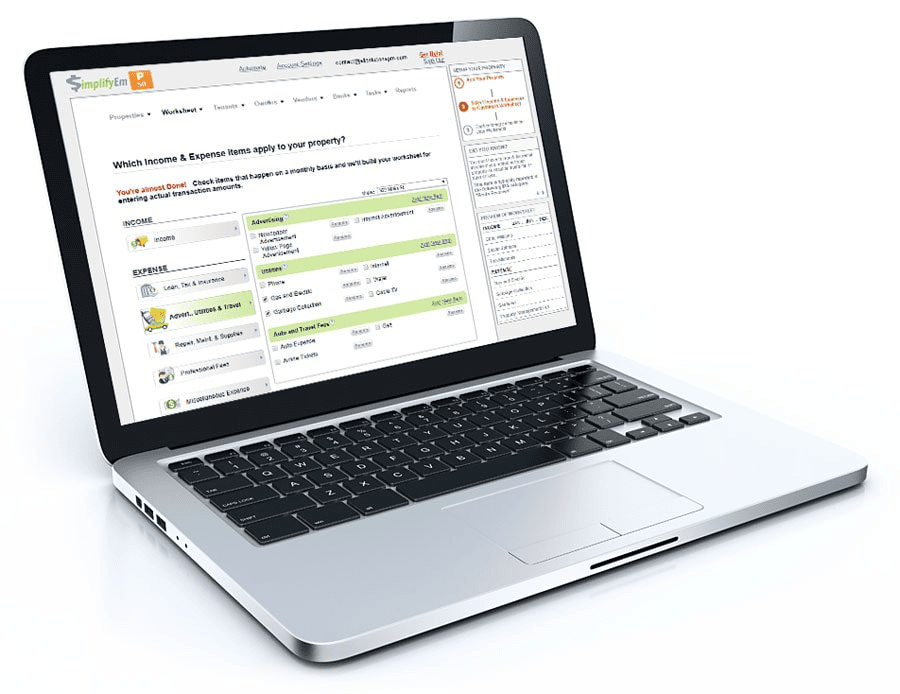
A laptop displaying the SimplifyEm property management software interface, showing various income and expense items for a property.
The SimplifyEm property management software interface provides an organized view of income and expense items for efficient property management.

SimplifyEm is known for its intuitive design and straightforward features aimed at making property management simpler. Here’s what you can expect:

Accounting – Track your finances effortlessly with built-in accounting features.

Credit Check – Perform credit checks on potential tenants to ensure reliability.

Communication Management – Manage all tenant communications in one place.

Online Payments – Enable tenants to pay rent online, simplifying the collection process.

Document Management – Store and manage important documents securely.

Work Order Management – Handle maintenance requests with ease.

Tenant Tracking – Keep detailed records of all tenant information.

Portal for All – A dedicated portal for tenants, owners and vendors  to make online payments and requests on time.

Tax Management – Manage and track taxes efficiently.

Rent Tracking – Monitor rent payments and track overdue accounts.

Rent Collection – Automate rent collection to ensure timely payments.

Listing Management – Easily manage property listings and vacancies.

Features of DoorLoop

Doorloop aims to streamline property management with these features:

Accounting Integration – Built-in accounting features to keep your finances in check.

Maintenance Management – Simplify the process of handling maintenance requests.

Tenant Portal – A dedicated portal for tenants to make payments and requests.

Customizable Dashboards – Create dashboards to monitor key metrics at a glance.

Pricing Model

Here’s a look at the pricing for both platforms:

SimplifyEm Pricing

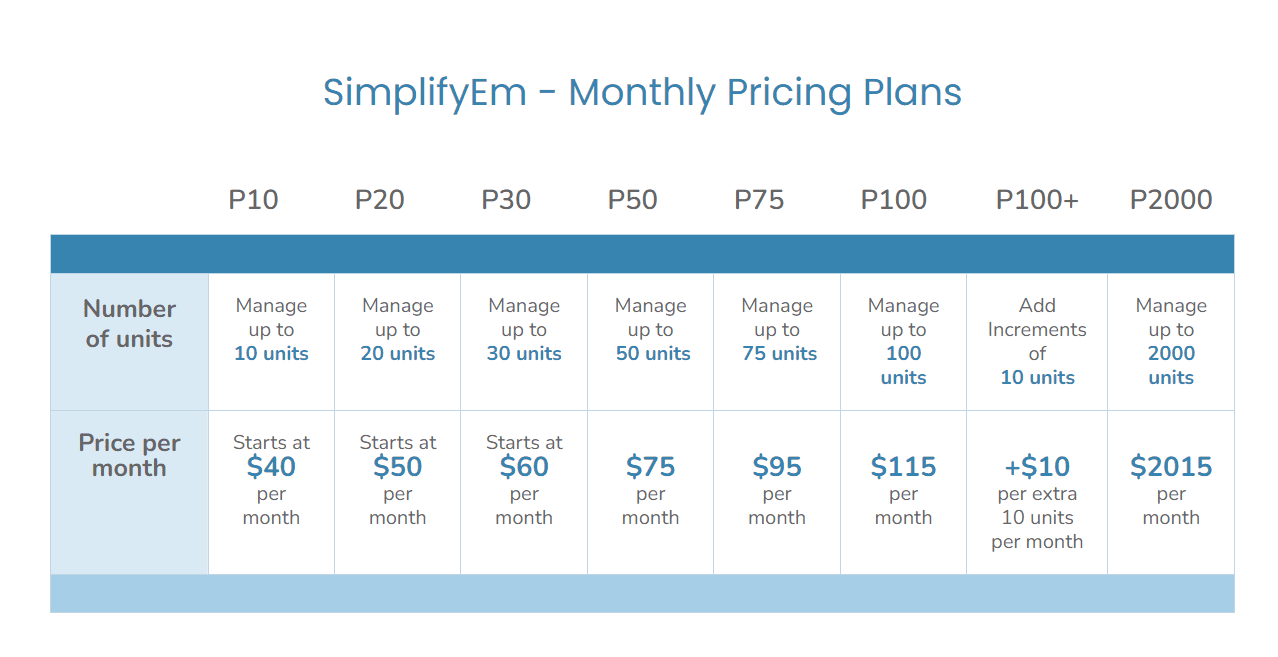
SimplifyEm Monthly Pricing Plans table showing different pricing tiers based on the number of units managed.
SimplifyEm offers a range of monthly pricing plans based on the number of rental units managed, starting at $40 per month for up to 10 units.

SimplifyEm Property Management Software Plans: Starter and Plus

Managing rental properties can be a breeze with the right tools. SimplifyEm offers two robust plans to cater to different property management needs: the Starter plan and the Plus plan. Here’s a breakdown of what each plan offers in simple terms.

Starter Plan (1 – 30 Units)

The Starter plan is perfect for smaller property managers handling up to 30 units.  Here’s what you get:

  • Full income & expense tracking
  • Generating detailed reports
  • Online payments
  • Managing tenant & lease information
  • Manage vendors
  • Year-end taxes
  • Renter’s insurance
  • Professional owner reports
  • Unlimited document storage
  • Rental listings
  • Online rental applications
  • Online lease agreements
  • Tenant screening
  • Mobile App
  • Free Onboarding & Training
  • Email, text messages, & live phone support.  Support is also extended to tenants, owners and vendors.

Plus Plan (1 – 2000 Units)

The Plus plan is designed for larger property management operations, handling anywhere from 1 to 2000 units.   For every batch of 10 units above 100, the Plus plan is billed in increments of $10 per month. Contact sales@simplifyem.com for more details. 

This plan includes everything in the Starter plan and more:

  • Communication History
  • Two-Way Texting
  • Document Sharing
  • Portals
  • Manage Bank Accounts
  • Tasks & Work Orders
  • Sub-users & Access Rights
  • Automation
  • Export to QuickBooks & Excel
  • Free On-boarding & Training
  • Free Support: Email, text message, and live phone support are included. Free support for tenants, owners, and vendors.

Starter plans can get all of the Plus plan features at the P10, P20, P30 level for an additional $10/month.

DoorLoop Pricing

For a single unit, the pricing plans are as follows:

Starter Plan

  • $59.00 per month (Billed yearly)
  • For 1 unit: $69.00 per month

Pro Plan

  • $119.00 per month (Billed yearly)
  • For 1 unit: $139.00 per month

Premium Plan

  • $169.00 per month (Billed yearly)
  • For 1 unit: $199.00 per month

DoorLoop charges more for its Pro and Premium plans, which include additional features beyond the starter plan.

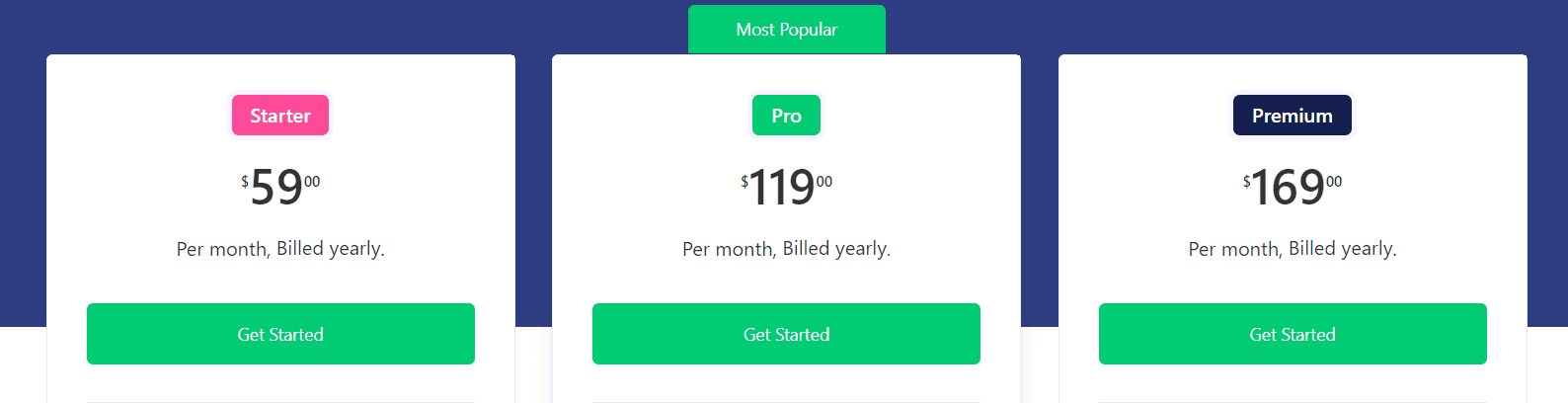
DoorLoop pricing plans showcasing Starter, Pro, and Premium tiers with respective monthly rates billed yearly.
DoorLoop offers three pricing tiers for its property management software: Starter at $59 per month, Pro at $119 per month, and Premium at $169 per month, all billed yearly.

Starter Plan Includes:

  • Accounting & Financials
  • CRM for Prospects
  • Maintenance
  • RapidRent Online Payments
  • Tenant Screening
  • eSignature
  • Email & Chat Support
  • Tenant Portal

Pro Plan: $119.00 Per Month (Billed Yearly)

  • Everything in the Basic Plan, plus:
    • Outgoing Payments
    • Owner Portal
    • Market Online
    • Calendar
    • User Access Roles
    • Bank Account Reconciliation
    • Tenant Announcements
    • Customizable Dashboards
    • Email, Chat, Phone, & Zoom Support
    • CAM Charges
    • QuickBooks Online Sync
    • Budgeting

Premium Plan: $169.00 Per Month (Billed Yearly)

  • Everything in Pro Plan, plus:
    • Free Incoming ACH Payments
    • API Access
    • Zapier Integration
    • Free Personalized Website
    • Unlimited Users
    • Unlimited Data Storage
    • Unlimited Free eSignatures
    • VIP Priority Support

User Reviews

SimplifyEm Reviews

  • Ease of Use: SimplifyEm is often praised for its user-friendly interface.
  • Customer Support: Quick and responsive support team.
  • Cost-Effective: Provides great value for money.

DoorLoop Reviews

  • Feature-Rich: Users appreciate the wide range of features.
  • Visual Dashboards: Customizable dashboards are a hit among users.
  • Learning Curve: Some users mention a slight learning curve due to the extensive feature set.

Integration

SimplifyEm Integration

SimplifyEm integrates seamlessly with various platforms, streamlining property management.SimplifyEm integrates with several rental advertising sites, including Zillow, Trulia, HotPads, Apartments.com, and Realtor.com. Additionally, we also integrate with:

  • Sureapp for Renter’s Insurance
  • Payscore for income verification
  • Contemporary Information Corp. provides tenant screening services
  • Twilio for two-way texting
  • ACH.com for online payments
  • Export for data is available for Quickbooks

DoorLoop Integration

DoorLoop also offers integrations with various third-party applications, making it easier to manage all aspects of property management from one platform.

Customer Support – SimplifyEm

At SimplifyEm, we’re all about making your property management experience as smooth as possible. World-class support team and dedicated onboarding team to ensure your success, whether you’re a new customer, a potential client, or simply have a question.

Product Demos

Curious about what SimplifyEm can do for you? Request a free, personalized demo with one of our product experts. Discover how our software can streamline your property management business and make your life easier.

Customer Support

Need assistance? Reach out to us at support@SimplifyEm.com,or schedule one-on-one training available at your convenience. Quick response times and reliable support. You can also give us a call at 1 (510) 790-9066. We’re here to help!

Feedback

Your feedback is invaluable to us! Whether you’re a real estate investor, property manager, or landlord, your insights help us improve and serve you better. Share your thoughts with us at feedback@SimplifyEm.com.

Contact Information

  • Feedback or Comments: feedback@SimplifyEm.com
  • Press Inquiries: press@SimplifyEm.com
  • Sales & Support: sales@SimplifyEm.com, support@SimplifyEm.com
  • Partner Inquiries: partners@SimplifyEm.com
  • Legal Inquiries: legal@SimplifyEm.com
  • SimplifyEm Careers: jobs@SimplifyEm.com

SimplifyEm is committed to being your reliable partner in property management.  Feel free to contact us with any questions or concerns. We’re here to assist you at every stage!

Customer Support – Doorloop

DoorLoop provides comprehensive support and training features to help you get the most out of your property management software.

  1. Support Options:
  • Support by email or chat –  Monday to Friday from (9 AM to 9 PM).

           Starter Plan: Email and Chat Support Only

            Pro Plan: Email, Chat, Phone, and Zoom Support

            Premium Plan: Everything in the other plans plus VIP Priority Support

 Demos and Trials

SimplifyEm Demo and Trial

  • Take a Test Drive: Explore SimplifyEm without commitment. Try out all the features without saving your details, it is ideal for a quick overview of the software. See how SimplifyEm can simplify your property management tasks.
  • Create a FREE Account: Get a free 15 day trial, no credit card needed. Save all your property management details. Access all features without limitations. Manage your tenants, leases, and finances in one place. Receive updates and support from our team.

DoorLoop Demo and Trial

DoorLoop offers a demo and a 14-day free trial, allowing you to explore all the functionalities before making a decision.

Pros and Cons

Pros of SimplifyEm

  • User-friendly interface
  • Cost-effective
  • Quick customer support

Cons of SimplifyEm

  • Need more advanced features.

Pros of DoorLoop

  • Extensive feature set
  • Customizable dashboards
  • Robust integrations

Cons of DoorLoop

  • Steeper learning curve
  • Higher starting price

FAQs

What is SimplifyEm?

SimplifyEm is intuitive property management software designed to simplify the daily tasks related to rental properties, tenant management, and finances.

How much does SimplifyEm cost?

SimplifyEm’s basic plan starts at $40/month, pricing plans vary according to the number of units managed.

What features does SimplifyEm offer?

SimplifyEm offers features like tenant tracking, expense management, automated reminders, and customizable reports.

Is there a free version of SimplifyEm?

SimplifyEm offers a free trial to help property managers get started with property management tasks. The free trial includes essential tools for managing properties, tenants, and finances, making it a great option for those who are new to property management software or have smaller portfolios. Once the free trial period is over, there is an opportunity to upgrade the subscription to a paid version.

Who can benefit from using SimplifyEm?

Property managers, landlords, and real estate investors can all benefit from using SimplifyEm. 

Conclusion

The choice between SimplifyEm and DoorLoop is ultimately based on your individual requirements and budget. SimplifyEm is an ideal choice for smaller businesses looking for a cost-effective, simple property management solution. Its core features are ideal for people who value simplicity and cost-effectiveness.

On the other hand, DoorLoop’s advanced capabilities make it suited for larger portfolios that demand a more comprehensive toolkit.

Are you ready to streamline your property management processes? Take advantage of SimplifyEm’s free trial today to learn how it can easily integrate into your workflow. Don’t pass up the opportunity to simplify your property management with a solution tailored to your needs.Try SimplifyEm now!


Best Property Management Software: SimplifyEm vs AppFolio

Filed Under: Property Management

Introduction

Selecting the ideal property management software is a pivotal decision for property owners and managers, as the right tool can significantly streamline operations and enhance productivity. Among the many options available, SimplifyEm and AppFolio emerge as two prominent choices, each offering unique features tailored to different needs. SimplifyEm is renowned for its user-friendly interface, flexible pricing, and extensive support, making it a favorite among landlords and managers seeking a straightforward yet powerful solution. It excels in automating daily tasks such as online rent collection, tenant and lease information management, and maintenance request handling, thus freeing up valuable time and resources.

Two women sitting at a table, smiling and talking, each with a notebook open in front of them. The background features large windows with a view of a city building.
A productive meeting between property managers discussing the best property management software options, including SimplifyEm and AppFolio.

On the other hand, AppFolio is known for its comprehensive real estate management platform, which caters to various property types and incorporates advanced automation and AI tools. While it offers a broad set of features aimed at maximizing efficiency, its complexity and extensive onboarding process might be overwhelming for some users.

This guide aims to make your decision-making easier by offering a detailed comparison of SimplifyEm and AppFolio. We will explore their features, pricing structures, user experiences, and overall benefits to help you determine which software best aligns with your property management needs and goals. Whether you focus on ease of use, cost-effectiveness, or advanced functionalities, this guide will offer the essential insights you need to make a well-informed decision.

Overview of SimplifyEm

SimplifyEm is a leading and trusted property management software used by landlords and property managers across the U.S. since 2006. With over 150,000 satisfied customers, SimplifyEm offers user-friendly software that automates day-to-day tasks, freeing up your time. Managing properties requires significant effort to handle tenant and owner interactions. As your portfolio grows, having different property types and staying on top of everything becomes challenging. Having all the information at your fingertips is crucial, which is difficult without the right tool. SimplifyEm is here to help with its all-in-one, easy-to-use, and cost-effective software solution.

Overview of AppFolio

AppFolio is a platform designed for real estate management that offers a range of features for different property types. It has a centralized data platform aimed at improving productivity and includes automation and AI tools for efficiency. The design of AppFolio allows for use across various devices, which can help property managers with their daily tasks and growth. However, its extensive feature set might come with a steeper learning curve and the necessity for thorough onboarding. While it provides a broad set of tools, it might be complex for those looking for a simpler, more straightforward solution.

Key Features Comparison

Two women collaborating at a desk, looking at a laptop screen together in a modern office setting.
Exploring the features of top property management software with a focus on SimplifyEm and AppFolio.

Ease of Use

SimplifyEm:

  • User-friendly interface designed for quick navigation.
  • Simplified reports that are easy to read.
  • Smooth interactions and a short onboarding period.

AppFolio:

  • Centralized data platform enhancing overall productivity.
  • Customizable tech stack to fit business operations.
  • Advanced features that may require a longer onboarding period.

Pricing

SimplifyEm: Flexible Plans, Transparent Pricing

SimplifyEm offers flexible plans designed to match the diverse needs of your real estate portfolio. With transparent pricing, you know exactly what you’re paying for and get precisely what you need to manage your properties efficiently.

Choose from a range of pricing tiers to match your portfolio size:

  • P10: Manage up to 10 units, starting at $40/month.
  • P20: Manage up to 20 units, starting at $50/month.
  • P30: Manage up to 30 units, starting at $60/month.
  • P50: Manage up to 50 units for $75/month.
  • P75: Manage up to 75 units for $95/month.
  • P100: Manage up to 100 units for $115/month.
  • P100+: Add increments of 10 units for +$10/month after 100 units.
  • P2000: Manage up to 2000 units for $2015/month.

AppFolio:

AppFolio offers a subscription-based pricing model, which varies based on the type and number of units managed. Here is a general overview of the pricing structure:

  1. AppFolio Property Manager:
    • Residential Properties: $1.49 per unit per month with a minimum monthly fee of $298 per month plus a 50 unit minimum.
    • Community Associations: $0.85 per unit per month with a minimum monthly fee of $298 spend per month and a 50 unit minimum.
    • Commercial Properties: Custom pricing based on the portfolio, but it starts at $1.50 per unit per month with a monthly fee of $298 and a 50 unit minimum.
  2. AppFolio Investment Management:
    • Pricing is custom and depends on the specific needs and size of the investment portfolio, but it starts at $650 per month.

Customer Support

SimplifyEm:

  • Free comprehensive support, including phone, email and sms.
  • A dedicated team for free training sessions to get users started quickly.
  • Proactive customer service with a focus on user satisfaction.

AppFolio:

  • Multiple support channels, including phone and email.
  • A dedicated onboarding team for secure data migration and training is needed.
  • Frequent updates and added features to enhance user experience.

Maintenance Tracking

SimplifyEm:

  • Easy submission of maintenance requests by tenants.
  • Automated maintenance scheduling to ensure timely upkeep.
  • Tracking of communication between tenants, vendors, and property managers.

AppFolio:

  • Robust maintenance management tools are integrated into the platform.
  • Automated alerts and tracking of maintenance requests.
  • Vendor management and invoice creation for efficient processing.

Financial Reports

SimplifyEm:

  • Provides detailed financial reports, including profit & loss, income, and expense tracking.
  • Generated detailed financial reports, including cash flow and tax reports.

AppFolio:

  • Integrated accounting features for streamlined bookkeeping.
  • Insights and tips for optimizing financial health.

Tenant Communication

SimplifyEm:

  • A tenant portal is used for seamless communication and transaction history.
  • Online rent payment processing and automated reminders.
  • Features also  include tenant screening, lease management, and online payments.

AppFolio:

  • Centralized communication tools for landlords and tenants.
  • Enhanced tenant management with screening and balance tracking.
  • Comprehensive portals for both tenants and property managers.

User Experience of SimplifyEm and AppFolio

SimplifyEm

SimplifyEm is highly praised for its user-friendly interface, which is designed to be intuitive and easy to navigate allowing property managers to access key features quickly without a steep learning curve. The software’s cloud-based nature ensures that property managers can access their data from anywhere, making it convenient for those who need to manage properties on the go.

One standout feature is the online rent collection system, which users find straightforward and secure as it simplifies tracking and updating details. Maintenance request management is also streamlined, allowing for efficient handling and tracking of issues, which users report has significantly improved their response times.

Users also commend SimplifyEm’s customer support, which is described as responsive, helpful, and free. The free training offered is a significant benefit; overall, SimplifyEm is favored for its ease of use, practical features, and excellent support.

AppFolio

AppFolio, on the other hand, offers a more comprehensive and feature-rich platform, which can be both a strength and a drawback. Users who need advanced functionalities appreciate the robust tools available, such as automation and AI-driven features that help maximize efficiency. The platform’s centralized data system is beneficial for managing various property types, from single-family homes to commercial properties.

However, the extensive feature set means that AppFolio can have a steeper learning curve. Some users find the onboarding process to be lengthy and challenging, requiring more time to get accustomed to the system. Despite this, once users become familiar with the platform, they often find that it significantly enhances their productivity.

Why SimplifyEm is a Better Choice

SimplifyEm stands out with its user-friendly interface, flexible pricing, and extensive, free support. Its powerful features are Online Rent Collection, Tenant and Lease Management, Account Automation, and Manage Maintenance Requests, which streamline their operations. The consistent feature access across all pricing plans and the availability of free training further enhance its appeal.

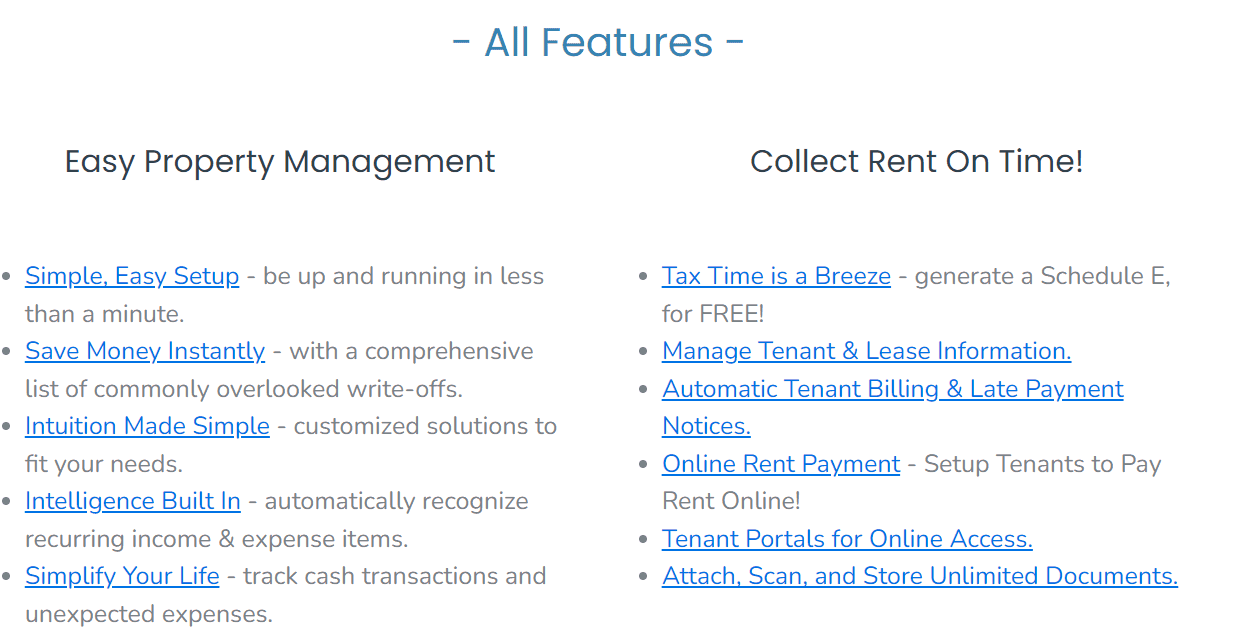
A list of features offered by SimplifyEm property management software, divided into two sections: Easy Property Management and Collect Rent On Time.
feature list of SimplifyEm property management software, highlighting its ease of setup, financial management, and rent collection capabilities.

With SimplifyEm, property managers can significantly improve efficiency, reduce manual workload, and ensure all crucial information is readily accessible. This makes it an excellent choice for those seeking a robust and reliable property management solution.

Conclusion

In conclusion, both SimplifyEm and AppFolio offer robust property management solutions. However, SimplifyEm’s intuitive design, cost-effective pricing, and outstanding customer support make it an excellent option for property managers seeking an efficient and scalable platform. By signing up for SimplifyEm, you can ensure that your property management operations are streamlined, productive, and financially optimized.

Book a Free Demo

Interested in learning more? Book a free demo to see how SimplifyEm can transform your property management operations.


Property Management Software Comparison: SimplifyEm vs Buildium

Filed Under: Property Management

Introduction to Property Management Software

In the field of property management, maintaining efficiency and organization is essential for success. Property management software is pivotal in optimizing these processes.  We’ll explore the key aspects of property management software, what to look for and why it is essential for modern property management businesses including a comparison between SimplifyEm and Buildium.

Smiling property manager working at a desk with a laptop
Efficient Property Management with User-Friendly Software

Exploring the World of Property Management Software

Property management software may help property managers manage all elements of their properties, from rent collecting and maintenance tracking to tenant communication and financial reporting. It serves as a central hub for organizing all property-related tasks in an easy and efficient manner.

Importance of Property Management Software

The usage of property management software can greatly boost productivity, decrease manual errors, increase tenant happiness, and provide important insights for smarter decisions. By automating tedious operations and centralizing data management, property managers can concentrate on strategic planning and business growth.

When selecting property management software, it’s essential to consider features that will streamline your operations and address the unique requirements of your property management business.

Automate Rent Collection

Hands exchanging a credit card and mobile payment device
Streamlined Rent Collection with Property Management Software

Automating rent collection is a crucial feature in property management software. It simplifies the payment process for tenants and ensures timely and accurate rent collection for property managers. Look for software that offers online payment options, automatic reminders, and a system for tracking payment histories.

Maintenance Tracking

Effective maintenance management is vital for tenant satisfaction and property upkeep. Choose software that allows tenants to submit maintenance requests online and enables property managers to track the status of these requests. Features like maintenance scheduling and vendor management can further enhance efficiency.

Accounting Tools

Robust accounting tools are necessary for managing the financial aspects of property management. The software should offer features such as income and expense tracking, as well as tax preparation reports. Integration with accounting software like QuickBooks can also be beneficial.

Tenant Communication Portal

A tenant communication portal facilitates seamless interaction between tenants and property managers. This feature allows for efficient handling of tenant inquiries, lease renewals, and notices. A centralized communication hub can significantly improve tenant satisfaction and streamline operations.

Reporting Capabilities

Extensive reporting capabilities are crucial for making well-informed business decisions. The software should provide customizable reports on various aspects of property management, including financial performance, occupancy rates, and maintenance activities. These reports help property managers identify trends and areas for improvement.

Why Choosing the Right Property Management Software Matters

Choosing the right property management software is paramount for property managers aiming to enhance their operations and boost efficiency.  Property management involves juggling numerous tasks, from rent collection and maintenance tracking to tenant communication and financial reporting. The right software can make these tasks much easier, cut down on manual mistakes, and give property managers more time to work on important projects.

In this comparison, we will be analyzing the features, benefits, and pricing of SimplifyEm and Buildium, two popular property management software options. By understanding the strengths and weaknesses of each platform, property managers can select the software that best aligns with their needs and budget. SimplifyEm and Buildium each offer unique advantages, and SimplifyEm and Buildium both have their own benefits. The best choice depends on what your property management business needs and its size.

 Overview of Buildium

Buildium, founded in 2004, is a property management software that has gained recognition in the industry for its solutions designed for property managers and real estate professionals.

Target Audience: Buildium is designed to cater to a diverse range of property managers and real estate professionals, regardless of portfolio size or property type. Whether you’re managing single-family homes, multifamily properties, community associations, commercial buildings, or a mix of property types, Buildium provides a unified platform to streamline operations and drive business growth.

Buildium Main Features

 Buildium boasts an array of features designed to simplify property management tasks, enhance efficiency, and support business growth. Here are some of the key features:

  1. Business Operations: Anchor your daily operations with features that streamline communication, manage maintenance requests, and track association violations,.
  2. Leasing: Bring your entire lead-to-lease cycle online with features that facilitate advertising vacant units, scheduling showings, customizing rental applications, and running comprehensive tenant screenings.
  3. Accounting & Payments: Automate bookkeeping, collections, and payments with features that manage the entire payment process online, ensure financial accuracy, and simplify tax filing with Form 1099.
  4. Marketing: Boost your brand and attract residents and clients with features that enable you to set up a property management website, advertise listings, and connect with property owners in your target areas.
  5. Business Performance: Gain insights into your portfolio’s performance with a suite of reporting tools, manage your business strategically with analytics and insights, and leverage Open API to build custom integrations and enhance workflow efficiency.

Overall, Buildium offers a simple-to-use, unified property management platform that balances automation, ease of use, and business growth, making it the ideal choice for property managers looking to streamline operations and drive success in the competitive real estate market.

Buildium Pricing

Buildium has three pricing levels:

  1. Essential: Starting at $55/month, this plan includes core features like accounting and task management, ideal for property management companies.
  2. Growth: Starting at $174/month, this plan is designed for property managers who want to expand without worrying about scaling costs. It includes unlimited eSignatures and insights from the Analytics Hub.
  3. Premium: Starting at $375/month, this plan offers full access to all Buildium features with more customization and automation. It includes everything in the Growth plan plus access to Buildium’s Open API and Priority Support.

Overview of SimplifyEm

SimplifyEm has established itself as a leading property management software in the market with over 200,000 happy customers, making it a reliable tool in the property management industry. SimplifyEm was founded with the mission to provide user-friendly and affordable property management software for small to mid-sized property managers. The company has focused on creating software that simplifies the complexities of property management, making it accessible to those with minimal technical expertise. With continuous updates and customer-centric improvements, SimplifyEm has swiftly become a top choice for property management professionals. Known for its ease of use and outstanding customer service, SimplifyEm has also been recognized for its exceptional support,

Target Audience

SimplifyEm is specifically designed for small to mid-sized property managers who need an efficient and straightforward way to manage their properties.  SimplifyEm can also manage single-family homes and multifamily properties, making it a versatile tool for various property management needs.  It caters to landlords, property owners, and real estate investors who require a cost-effective solution to streamline their operations without sacrificing essential features

SimplifyEm Main Features

SimplifyEm offers a range of key features that make property management easier:

  • Rent Collection Automation: Streamlines the rent collection process with online payment options and automatic reminders.
  • Maintenance Request Tracking: Allows tenants to submit maintenance requests online and helps property managers track and manage these requests efficiently.
  • Financial Reporting Tools: Provides detailed financial reports, including profit & loss, tax reports, income and expense tracking.
  • Tenant Portal for Communication: Facilitates seamless communication between property managers and tenants, enhancing tenant satisfaction.
  • Property Vacancy Management: Manages property vacancies effectively, helping to reduce turnover times and keep properties occupied.

Pricing Options for SimplifyEm

SimplifyEm Pricing Tiers

Choose from a range of pricing tiers to match your portfolio size:

  • P10: Manage up to 10 units, starting at $40/month.
  • P20: Manage up to 20 units, starting at $50/month.
  • P30: Manage up to 30 units, starting at $60/month.
  • P50: Manage up to 50 units for $75/month.
  • P75: Manage up to 75 units for $95/month.
  • P100: Manage up to 100 units for $115/month.
  • P100+: Add increments of 10 units for +$10/month after 100 units.
  • P2000: Manage up to 2000 units for $2015/month.


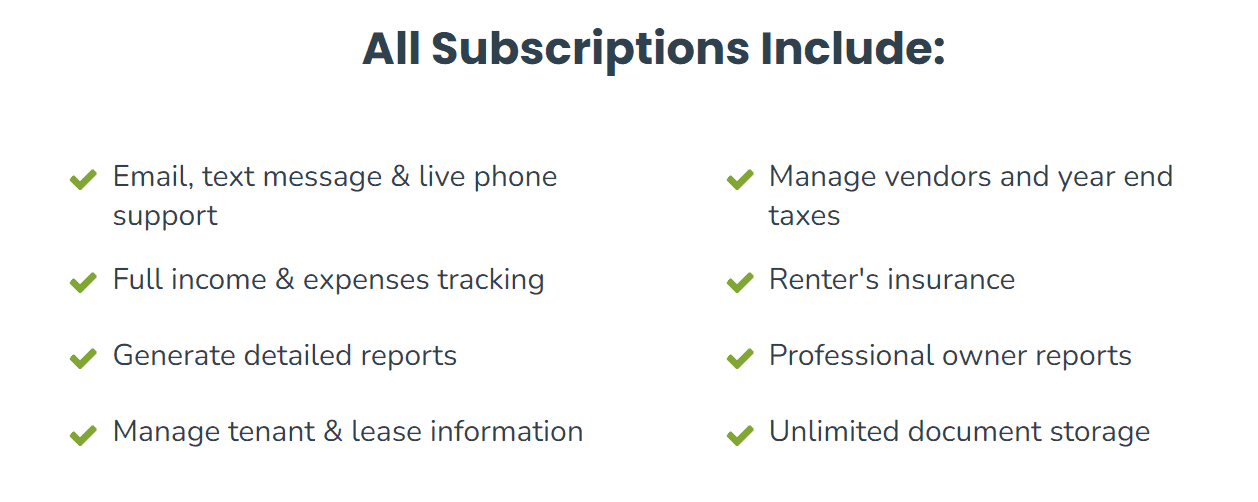
List of features included in all SimplifyEm subscriptions
Features in All SimplifyEm Subscriptions

Head-to-Head Comparison

User-Friendliness and Ease of Use

SimplifyEm excels in simplicity and ease of use, making it ideal for property managers who prefer a straightforward interface. On the other hand, Buildium provides greater customization options and advanced features, which might take some time for new users to learn.

Customization and Scalability

Buildium stands out for its robust customization options and scalability, allowing property managers to tailor the software to their specific needs and accommodate growth. SimplifyEm, while more limited in customization, offers a cost-effective solution for small to mid-sized property portfolios.

Customer Support and Training

Both SimplifyEm and Buildium provide customer support via phone, email, and online resources.

Customer Support with Buildium

Ongoing Support:

  • Essentials Plan: Only ticket support
  • Growth Plan: Ticket support and live phone support are included; priority support is available for purchase
  • Premium Plan: Ticket support, live phone support, and priority support are included

Support Limitations:

  • No support for tenants, owners, or vendors.

Onboarding and Training Costs:

  • Charges apply for these services.

SimplifyEm Customer Support: Your Partner in Property Management

  • Live Phone Support: Available Mon-Fri 9 am-5 pm PST
  • 24/7 Email Support: Reach us at support@SimplifyEm.com
  • Extensive Assistance: Support for tenants, owners, and vendors
  • Free Onboarding and Training: For you, assistants, and employees
  • 30-Day Money-Back Guarantee: For annual subscriptions
  • Contact Information:
    • Email: support@SimplifyEm.com
    • Phone: 1 (510) 790-9066

Commitment to Service

At SimplifyEm, we are committed to providing exceptional service and support for all your property management needs. Whether you’re a new customer seeking assistance, a potential client interested in our software, or have any questions, our dedicated team is here to help!

Conclusion

In this thorough comparison, we have delved into the key features, pricing options, and user-friendliness of both SimplifyEm and Buildium. SimplifyEm stands out with its user-friendly interface and affordability, making it an excellent choice for smaller property management businesses or those just starting out. It offers essential tools for managing properties efficiently without overwhelming users with unnecessary complexity.

When making your decision, consider your specific property management needs and budget. SimplifyEm is perfect for those who prioritize simplicity and cost-effectiveness, while Buildium is better suited for businesses looking for a more comprehensive and customizable solution.

Ready to Simplify Your Property Management Business?

If SimplifyEm sounds like the right fit for your property management needs, we invite you to take the next step https://www.simplifyem.com/  and experience its features firsthand.

Schedule a Demo Today!

Visit SimplifyEm’s Demo Scheduling page to book a personalized demo. Our team will walk you through the software, showcasing how SimplifyEm can streamline your property management tasks, save you time, and improve your efficiency.

Guidelines for Selecting the Best Property Management Software for Your Business

  • Evaluate your current and future property management needs.
  • Consider your budget and pricing options.
  • Test out demos and compare essential features.
  • Seek recommendations from other property managers.

FAQs

Can I switch from Buildium to SimplifyEm or vice versa easily? 

Yes, both SimplifyEm and Buildium offer support for transitioning from other software platforms.

Do SimplifyEm and Buildium offer mobile applications for on-the-go management?

Yes, both platforms provide mobile applications to manage properties on the go.

How can I determine which property management software is best for my business?

Evaluate the features, pricing, and scalability of each software based on your business needs and test demos to see which one fits best.


  • « Go to Previous Page
  • Page 1
  • Interim pages omitted …
  • Page 4
  • Page 5
  • Page 6
  • Page 7
  • Page 8
  • Interim pages omitted …
  • Page 19
  • Go to Next Page »

Primary Sidebar

SimplifyEm
Streamline Your Property Management

Schedule A FREE Demo

Table Of Contents

SimplifyEm

  • Property Management Software
  • SimplifyEm Reviews
  • About Us
  • Pricing
  • SimplifyEm CRM
  • Terms and Conditions
  • Privacy Policy
  • SimplifyEm Security

Features

  • Property Management
  • Online Rent Payments
  • Affordable Tenant Screening
  • Rental Listing
  • Request Demo
  • Accounting Software
  • Reconciliation
  • Tenant Screening
  • 1099 eFiling Feature
  • Reports
  • Communication Center
  • Integrated Rental Application
  • Rental Listing
  • Online Rent Payments
  • Tenant Portal
  • AI in Property Management

Forms

  • Lease Agreement
  • Notice To Quit
  • Notice To Pay Rent
  • Rental Application
  • Rental Inspection
  • Lease Termination
  • Eviction Notice

Resources

  • Blog
  • Property Management Companies
  • Law
  • Buzz
  • FAQ

Company

  • Contact Us
  • Support
  • Press And Media
  • Career


SimplifyEm Property Management Software Logo

Follow us

Facebook Instagram Twitter LinkedIn YouTube

Download App

Google Play App Store
SimplifyEm Google Reviews - Rated 4.8 out of 5 SimplifyEm G2 Reviews - Rated 4.7 out of 5 SimplifyEm Software Advice Reviews - Rated 4.8 out of 5 SimplifyEm Capterra Reviews - Rated 4.7 out of 5

Copyright © 2025 SimplifyEm Inc. · All rights reserved.

Get Your Lease Agreement Form in Just One Step

I am a: