• Skip to primary navigation
  • Skip to main content
  • Skip to primary sidebar
SimplifyEm Property Management Software Logo

510-790-9066
510-790-9066
》Sign In
  • Features
    • Accounting Software
    • Reconciliation
    • Tenant Screening
    • 1099 E-filing
    • Reports
    • Communication Center
    • Integrated Rental Application
    • Rental Listing
    • Online Rent Payments
    • Tenant Portal
    • AI in Property Management
  • Property Management
    • Online Rent Payments
    • Tenant Screening
    • Rental Listings
    • SimplifyEm CRM
    • FAQ
  • Rental Forms
    • Lease Agreement
    • Rental Application
    • Notice to Vacate
    • Notice to Quit
    • Lease Termination
    • Notice to Pay Rent
    • Rental Inspection
    • Eviction Notice
  • Pricing
  • Reviews
  • Schedule Demo
  • FREE TRIAL!
  • 》​Sign​ In

SimplifyEm

Appfolio vs SimplifyEm: Property Management Software Comparison

Filed Under: Business Management, Features, Property Maintenance, Property Management, Property Management Software

Note: For latest information on Appfolio feature set and capabilities please contact Appfolio.

Choosing the right property management software in 2025 can make or break your rental business—especially when juggling accounting, rent collection, maintenance, and tenant communications. Two of the most recognized tools in the space are Appfolio and SimplifyEm, each with strengths tailored to different types of landlords.

Whether you’re an independent landlord with 20 units or a property manager overseeing thousands, this guide compares Appfolio vs SimplifyEm on key factors to help you find the best fit for your needs.

Quick Comparison: SimplifyEm Vs Appfolio

For a quick side-by-side look at features, pricing, support, and best use case, see the table below:SimplifyEm Appfolio Comparison

Tenant Management: SimplifyEm vs Appfolio

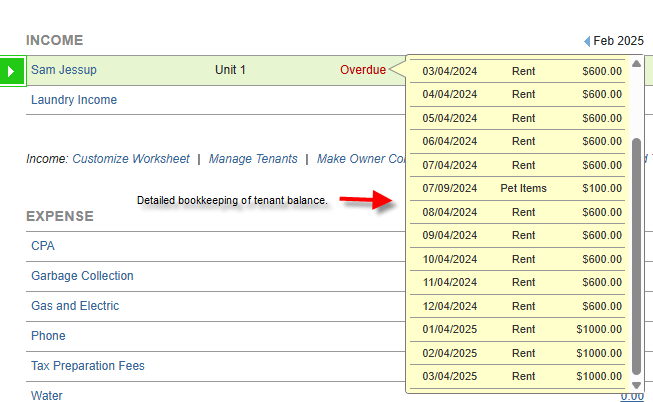
Both SimplifyEm and Appfolio offer solid tenant management tools. Appfolio includes advanced lease tracking, automated communication workflows, and robust tenant portals that allow residents to submit maintenance requests, view payment history, and message managers directly. It’s designed for high-volume property operations and supports more complex tenant needs.

SimplifyEm has all those capabilities to support the large property manager as well.

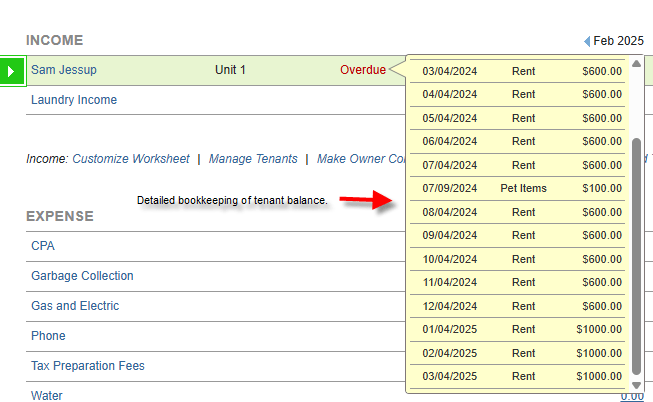
SimplifyEm can also keep things simple and highly usable for independent landlords and small portfolios. It offers automated rent reminders, easy lease tracking, and a tenant portal that simplifies communication and rent collection. For landlords who want straightforward tools without the bloat, SimplifyEm delivers powerful functionality in a user-friendly package.SimplifyEm Tenant Balance Tracking
CRM Capabilities: SimplifyEm vs Appfolio

When it comes to CRM (Customer Relationship Management), Appfolio stands out with a full-featured system designed to support leasing agents and large property teams. It offers pipeline tracking from lead to lease, automated follow-ups, and integration with marketing platforms—perfect for teams managing dozens of properties and multiple prospects.

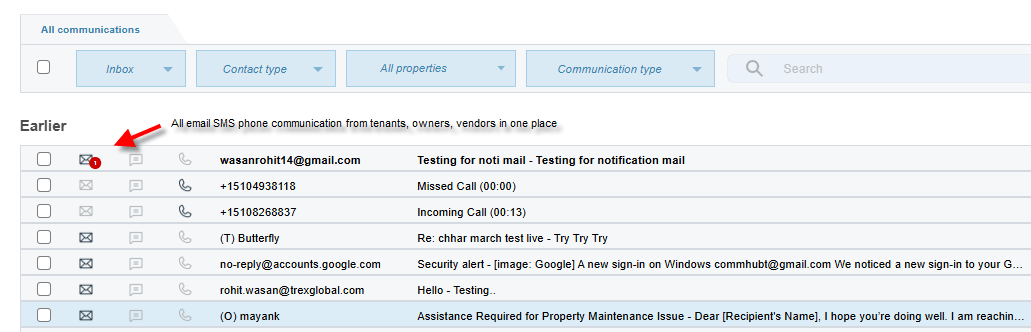
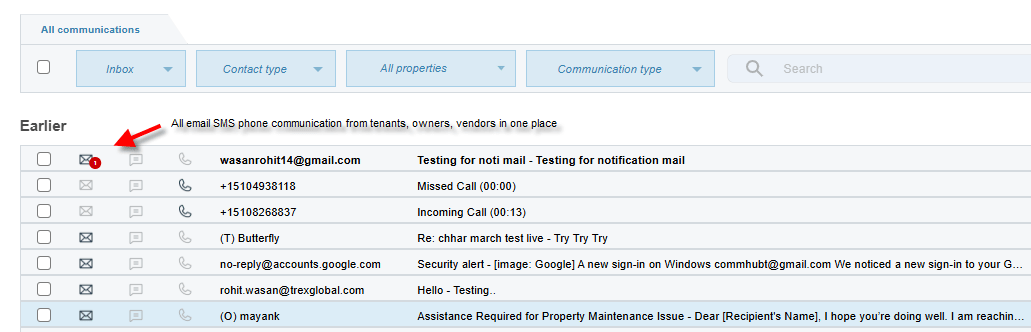
SimplifyEm has all those capabilities to support large property managers as well. SimplifyEm is also unique in providing a communication center that centralizes all communication across email, SMS and Phone.

SimplifyEm can also provide a simpler experience for the smaller property manager. Its CRM capabilities are streamlined for solo landlords or small teams who want to track basic prospect and tenant contact information without managing a complex sales funnel.SimplifyEm Communication Center
Accounting Functionality: SimplifyEm vs Appfolio

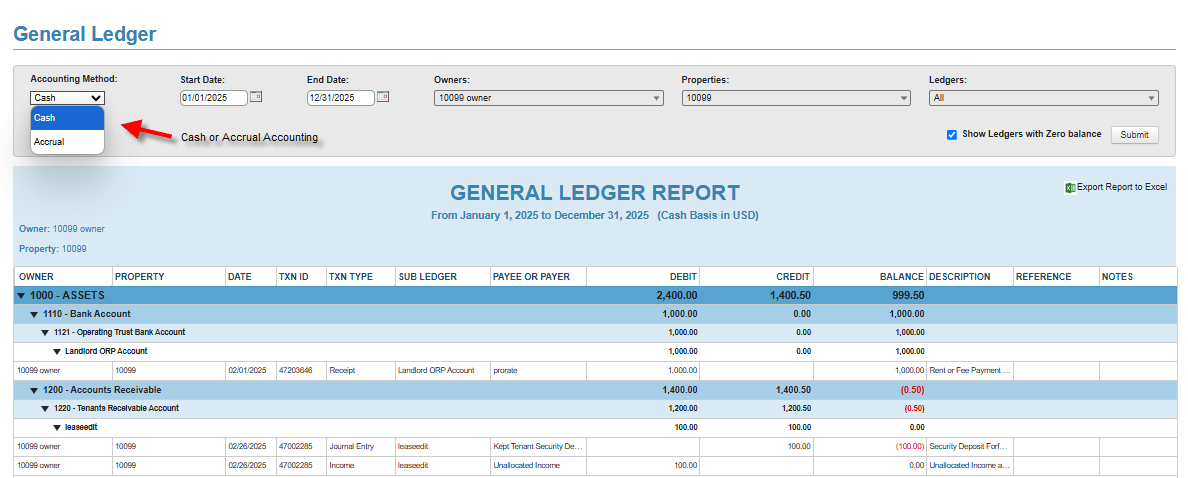
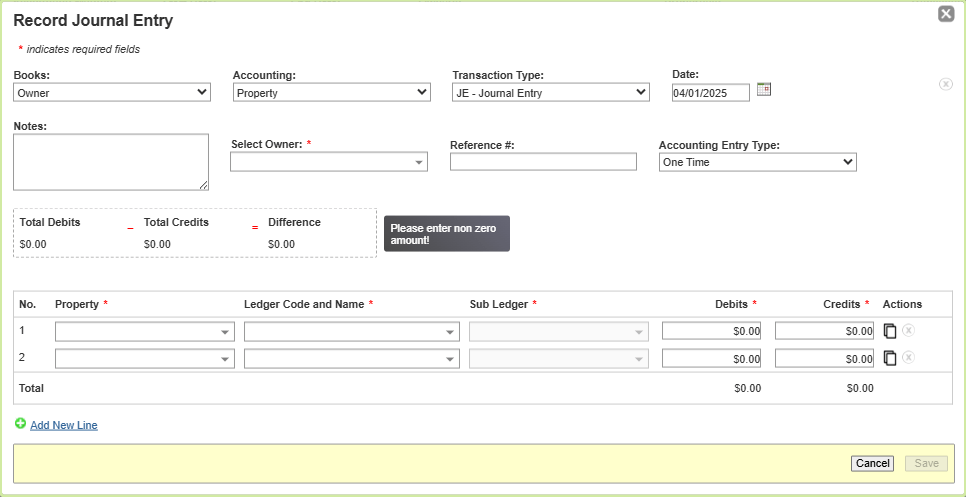
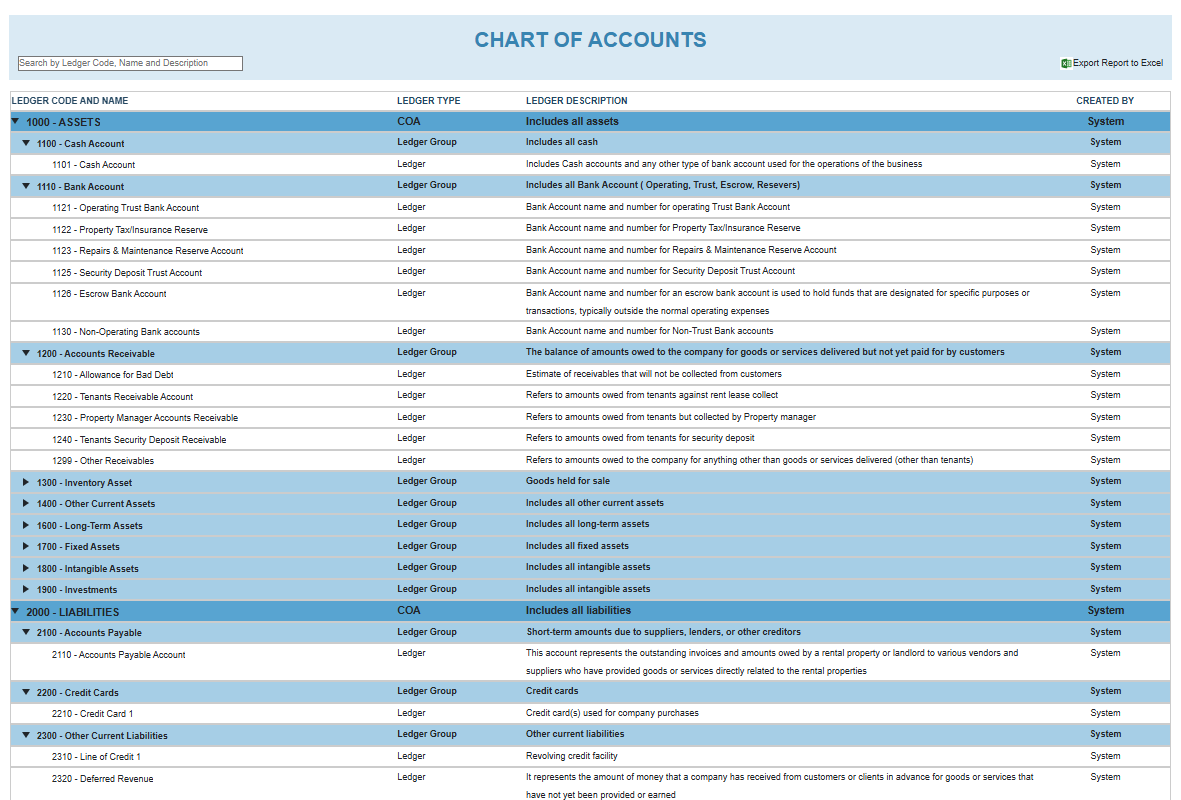
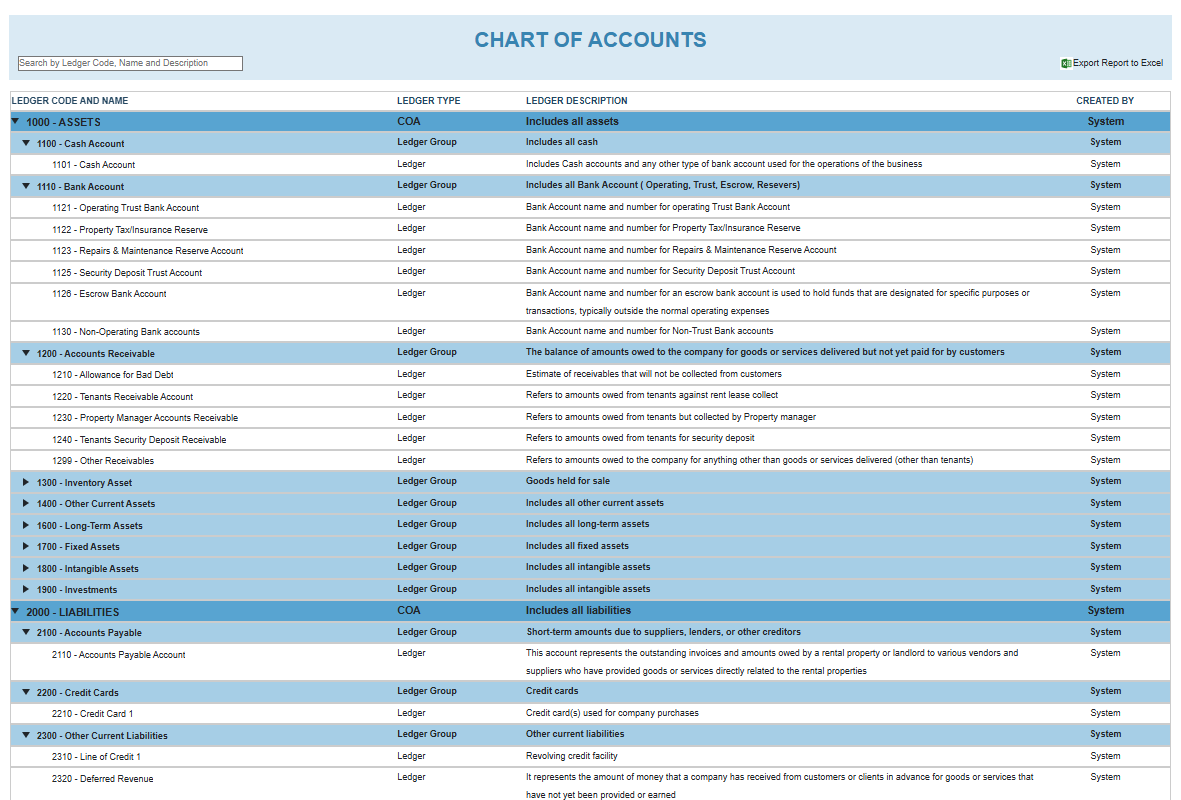
Accounting is a core strength for both platforms. Both Appfolio and SimplifyEm offer built-in trust accounting, automatic rent tracking, 1099 eFiling, and DRE-compliant reports—critical for landlords operating in regulated states like California. Its reports are clean, clear, and easy to generate without an accounting background. Both SimplifyEm and Appfolio provide a more customizable and robust accounting system that supports bank reconciliations, owner statements, and detailed transaction histories. Both SimplifyEm and Appfolio provide a thorough and customizable chart of accounts and audit tracking of all transactions.SimplifyEm Chart of Accounts
SimplifyEm Cash or Accrual Accounting


SimplifyEm Journal Entry

Summary of Appfolio functionality

Appfolio is a feature-rich solution for large-scale property managers. It has all the features and support needed for any situation with automated and customizable workflows. Appfolio’s accounting, CRM, Tenant, and online payment functionality are comprehensive and can meet the needs of large property managers.

Summary of SimplifyEm Functionality

SimplifyEm is also a feature-rich solution, but it can support small and large property managers equally. It has all functionality required for large property managers including a full accounting, CRM, Tenant Management, Online Payment capabilities.

The one difference is SimplifyEm can also be used by smaller property managers with simpler needs. One of the distinguishing features of SimplifyEm is you don’t have to setup nor use all the features provided for the software to be useful.

If you’re a small property manager that wants to keep track of income, expense, tenant balances and send automated owner reports. You can just set up those modules and not worry about banking, accounting and other modules if you so choose.
If you’re a large property manager managing thousands of units and you need to set up your own customized chart of accounts, have an audit log of all activities, do monthly automated 3 way reconciliations, you can fully setup SimplifyEm and use it equally well.

SimplifyEm’s customer WOW support is here to help you every step of the way.

Frequently Asked Questions (FAQs) about SimplifyEm and Appfolio Comparison

  • Which software is better: Appfolio or SimplifyEm?

    While both SimplifyEm and Appfolio are great for large property management businesses. SimplifyEm is also appropriate for smaller property managers with simpler needs at a lower price point.

  • What is property management software?

    Property management software helps property managers manage the financials for rental properties, along with managing the tenants, owner, vendor and trust bank accounts. Including managing their financials and also communications.

Sources:

https://www.federalreserve.gov/paymentsystems/fr-payments-study.htm
https://www.pewresearch.org/short-reads/2021/08/02/as-national-eviction-ban-expires-a-look-at-who-rents-and-who-owns-in-the-u-s/

What to Look for in Property Management Accounting Software: Essential Features Explained

Filed Under: Business Management, Features, Property Management, Property Management Software

Why Property Management Accounting Matters

Managing rental properties isn’t just about collecting rent—it’s about staying on top of your finances. If you’re a landlord or property manager, you need to know where your money is going, what’s coming in, and how to stay compliant with the law. That’s where property management accounting software comes in. But with so many options, how do you choose the right one?

This guide breaks it down in plain English. You’ll learn the basics of property management accounting, the must-know terms, and the top features to look for—plus how SimplifyEm can make it all easier.

1. What Is Accounting?

Accounting is simply the process of tracking money. It shows how much you earn, how much you spend, and what you owe. Every business uses accounting to make smart financial decisions.

2. What Is Property Management Accounting?

Property management accounting is a specialized type of accounting. It’s designed for rental properties and covers everything from rent collection to maintenance costs and owner payments. It also helps you follow legal rules, file taxes, and keep your books in order.

SimplifyEm handles all the accounting for you in an easy to use manner. You just enter the checks that come in and payments you make.

3. Key Property Management Accounting Terms (Made Simple)

Here are some important words you’ll see often. Don’t worry—we’ll keep it simple.

Accounting Period

The time you track finances for—usually monthly or yearly.

Accounts Payable

Money you owe, like repair bills or vendor invoices.

Accounts Receivable

Money owed to you, such as unpaid rent.

Accrual Accounting

Records money when it’s billed or earned—not when it’s paid.

Allocation

Splitting up income or costs between properties, units, or rent due.

Asset

Anything valuable your business owns.

Bookkeeping

Keeping track of daily income and expenses.

Bank Reconciliation

Making sure your records match your bank statement.

Cash Accounting

You record income or expenses only when money changes hands.

Chargeback

When a fee or payment is reversed.

Chart of Accounts

A list of categories used to organize finances. Common ones include:

  • Assets
  • Liabilities
  • Equity
  • Income
  • Expenses

NARPM Chart of Accounts

A standard layout many professional managers use, approved by the National Association of Residential Property Managers (NARPM).

Credit / Debit

Credits usually increase income or reduce expenses. Debits are the opposite.

Depreciation

Loss of value over time (think appliances or furniture).

Equity

Your ownership value after debts are paid.

Expense

Money spent to operate the property—repairs, utilities, etc.

Fixed Cost

A regular cost that doesn’t change, like insurance.

General Ledger (G/L)

A full record of all financial transactions.

GAAP

Rules for how businesses should handle accounting. It stands for Generally Accepted Accounting Principles.

Liability

Money you owe—like a loan or unpaid bill.

Overhead

Everyday business costs, like office rent or software.

Revenue

The money you bring in—mostly from rent.

4. Cash vs. Accrual: Which Accounting Method Is Best?

There are two main methods:

  • Cash accounting: Record money when it’s paid or received. It’s simple and great for small landlords.
  • Accrual accounting: Track income and expenses when they’re billed—even if no money has moved. It gives a clearer picture of your finances.

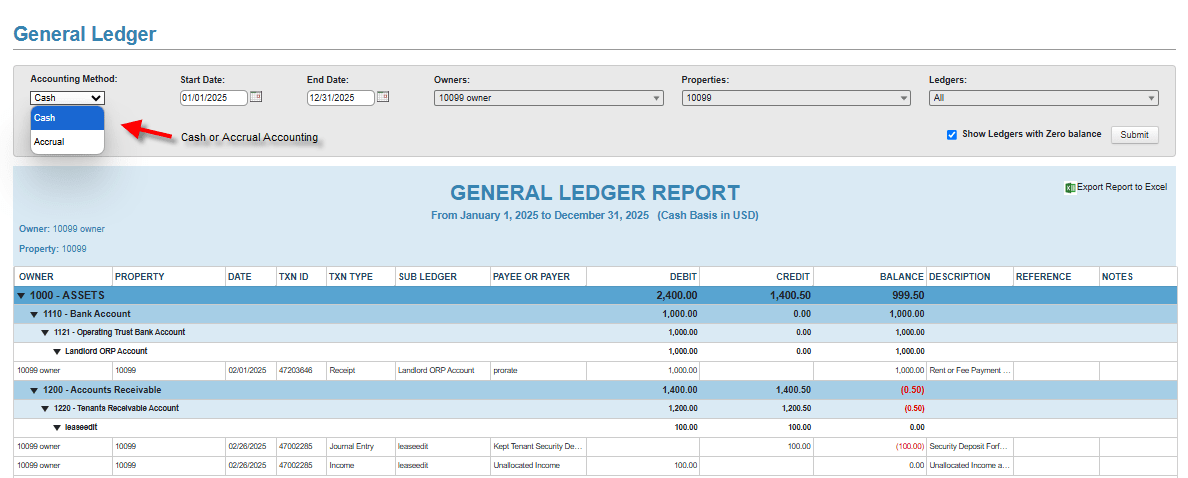
Tip: The IRS usually allows landlords to use cash accounting. For more details, check out the IRS rental income guide. SimplifyEm will allow you to see your accounting in a cash or accrual basis, it keeps track of things both ways without any extra work on your part.

5. Trust Accounting: Keep Owner and Tenant Money Safe

Many states require trust accounts to hold tenant rent or security deposits. These accounts must be separate from your business account and follow state rules.

For example, in California, property managers must open a trust account and follow strict reporting rules. Here’s a helpful guide from the CA Department of Real Estate.

SimplifyEm has built-in tools that support trust accounting and help you stay compliant in an automated manner.

6. Tracking Tenant Balances

Accurate tenant records are a must. Look for accounting software that tracks:

  • Rent paid and due
  • Late fees
  • Security deposits
  • Credits and refunds

With SimplifyEm, tenant balances are automatically updated and easy to access anytime.

SimplifyEm Tenant Balance Tracking

7. Owner Statements and Payouts

If you manage properties for others, you’ll need clear records for them too. Good accounting software should:

  • Generate monthly owner statements
  • Track income and expenses by property
  • Handle automated owner payouts
  • Help with tax forms like 1099s

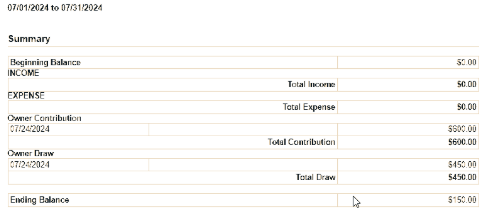
SimplifyEm Owner Balance Tracking

SimplifyEm does all this and more, giving owners access through their own secure portal.

8. How SimplifyEm Makes Property Management Accounting Easy

SimplifyEm was built for landlords and property managers who want smart features—without a big learning curve. Here’s what you get:

  • Automated rent tracking and bank syncing
  • Trust accounting support for state compliance
  • Customizable chart of accounts, that supports NARPM standards
  • Owner and tenant portals
  • One-click reports and 1099 eFiling

Bonus: It’s affordable and comes with free customer support.

SimplifyEm Cash or Accrual Accounting

SimplifyEm Chart of Accounts

Frequently Asked Questions (FAQs) about Property Management Accounting

  • What is property management accounting?

    It’s the process of tracking rent, expenses, deposits, and owner payouts in rental property businesses.

  • What is the best accounting software for property managers?

    SimplifyEm is a top choice for its ease of use, trust accounting tools, and landlord-friendly pricing.

  • Should I use cash or accrual accounting?

    Cash accounting is best for most small landlords. Accrual is better for larger portfolios or when you need a full financial picture.

  • Are trust accounts required?

    In many states—yes. Check your state’s real estate rules to be sure.

Sources:

https://www.irs.gov/taxtopics/tc414

https://www.dre.ca.gov/files/pdf/re25.pdf

The Importance of Providing Online Rent Payment to Your Property Management Business

Filed Under: Features, Property Management, Property Management Software, Tenant Management

What is Online Rent Payment?

Online rent payment refers to the digital processing of rental transactions, allowing tenants to pay rent electronically instead of using traditional methods like cash or checks. This process is typically facilitated through property management software or dedicated rent payment platforms. Payment options often include ACH bank transfers, debit/credit cards, and digital wallets, ensuring tenants have flexible ways to pay.

Why is it Important to Provide a Rent Payment Portal to Your Tenants?

Offering an online rent payment portal provides multiple advantages for both property managers and tenants. Here’s why it’s essential:

1. Faster and More Reliable Rent Collection

  • Reduces late payments with automated reminders and recurring payments.
  • Provides instant processing for faster fund transfers.
  • Minimizes the risk of lost or bounced checks.

2. Improved Efficiency and Reduced Administrative Work

  • Eliminates manual check handling and trips to the bank.
  • Integrates with accounting systems for seamless bookkeeping.
  • Automates record-keeping to reduce errors and save time.

3. Increased Tenant Satisfaction

  • Provides a hassle-free, 24/7 payment option.
  • Enables auto-pay to prevent missed deadlines.
  • Ensures secure transactions with encrypted payment processing.

4. Enhanced Security and Compliance

A 2022 U.S. Census Bureau report states that over 78% of renters prefer paying rent online. Additionally, the National Multifamily Housing Council (NMHC) reports that over 80% of property managers now provide digital payment solutions, reflecting industry-wide adoption.

Online rent portals use bank-grade encryption and PCI-compliant security protocols to protect sensitive data, ensuring that transactions remain secure and fraud risks are minimized.

What Kind of Features Should Your Online Payment Portal Provide?

Not all rent payment portals are created equal. The best systems offer features that enhance convenience, security, and automation. Here are the must-have features:

Pay via Computer or Mobile App

  • Tenants should be able to pay rent conveniently from their laptops, tablets, or mobile devices.
  • Mobile-friendly design ensures payments can be made anytime, anywhere.
  • Payment notifications and reminders can be sent via email or push notifications.

Easy, Quick Setup Without a Merchant Account

  • Unlike platforms such as AppFolio, Buildium, and DoorLoop, SimplifyEm allows property managers to start collecting rent instantly.
  • No need to set up third-party merchant accounts.
  • Fast integration with existing property management workflows.

Allow Tenants to Pay via ACH and Credit Card

  • Supports ACH (bank transfers) for lower transaction fees.
  • Accepts credit and debit card payments for flexibility.
  • Ensures secure and encrypted transactions for both landlords and tenants.

Allow Expedited Payments

  • Tenants can opt for same-day or next-day payment processing if they need to make a last-minute payment.
  • Reduces the risk of late fees and eviction proceedings.
  • Offers landlords the ability to receive funds faster to maintain steady cash flow.

Auto Payment Setup

  • Allows tenants to set up automatic monthly payments to avoid missed due dates.
  • Eliminates manual processing for landlords, ensuring consistent on-time payments.
  • Configurable options to customize recurring payments based on lease terms.

Update Payment When Lease Terms Change

  • Automatically adjusts payment amounts when lease agreements are renewed or modified.
  • Ensures tenants are billed the correct amount, preventing overpayments or disputes.
  • Provides a clear payment history for transparency.

Control When and How Much Payment Can Be Made in an Eviction Situation

  • Allows property managers to restrict payment options if a tenant is in the eviction process.
  • Provides the ability to control partial payments to comply with local regulations.
  • Prevents tenants from making unauthorized payments that might complicate legal proceedings.

How Can SimplifyEm Help You with Online Rent Payments?

SimplifyEm provides a robust and user-friendly online rent payment system that includes all the essential features property managers need. Here’s how SimplifyEm supports each key feature:Tenant Portal

Pay via Computer or Mobile App

  • Tenants can easily access their accounts and make payments from any computer, tablet, or mobile device.
  • The mobile-friendly interface ensures payments can be made on the go, with no need for downloads.
  • Automated reminders help tenants stay on top of due dates.

Easy, Quick Setup Without a Merchant Account

  • Unlike AppFolio, Buildium, and DoorLoop, SimplifyEm does not require third-party merchant accounts.
  • Property managers can start accepting rent payments within minutes.
  • No complex integrations—just plug and play.

Allow Tenants to Pay via ACH and Credit Card

  • Supports both ACH bank transfers and credit/debit card payments.
  • Offers secure encryption for all transactions.
  • Landlords receive real-time payment notifications.

Allow Expedited Payments

  • SimplifyEm provides same-day and next-day processing options.
  • Tenants can make urgent payments to avoid late fees.
  • Landlords can receive rent funds faster than traditional banking methods.

Auto Payment Setup

  • Tenants can enable auto-pay to ensure rent is always paid on time.
  • Customizable payment frequencies based on lease agreements.
  • This reduces late rent payment

Update Payment When Lease Terms Change

  • Automatically adjusts rent amounts when lease terms are updated.
  • Ensures smooth transitions during lease renewals.
  • Keeps both tenants and property managers informed with real-time updates.

Control When and How Much Payment Can Be Made in an Eviction Situation

  • SimplifyEm allows landlords to block or limit payments from tenants in eviction proceedings.
  • Prevents tenants from making partial payments that could interfere with legal actions.
  • Provides customizable payment restrictions per property.

Frequently Asked Questions (FAQs) about Online Rent Payment Functionality

  • Is online rent payment secure?

    Yes! SimplifyEm uses bank-grade encryption and PCI-compliant security to protect all transactions. Payments are processed through secure gateways to prevent fraud, and multi-factor authentication (MFA) ensures that only authorized users can access the system. Additionally, built-in fraud detection systems monitor transactions for any suspicious activity, ensuring peace of mind for both tenants and property managers.

  • Can tenants set up recurring payments?

    Absolutely! SimplifyEm offers an automated payment feature that allows tenants to schedule recurring payments. This eliminates the risk of forgetting rent deadlines, helps tenants avoid late fees, and provides property managers with a more consistent and reliable cash flow. Tenants can set up their payments in just a few clicks through their account dashboard, adjusting schedules as needed.

  • Are there any fees for online rent payments?

    Fees vary depending on the payment method used. ACH bank transfers typically come with lower fees, making them a cost-effective option for tenants. Credit and debit card payments may incur processing fees, which can be passed on to tenants if desired. Property managers can configure who covers transaction fees and view a breakdown of costs through SimplifyEm’s payment management dashboard.

  • How quickly are funds deposited into my account?

    Funds from ACH transactions are usually deposited within 1-3 business days, while credit card transactions may process faster. SimplifyEm also offers expedited payment processing, allowing property managers to receive funds the next business day when eligible. This ensures a steady cash flow and reduces financial strain caused by rent payment delays.

  • Can I block partial rent payments from tenants in eviction situations?

    Yes! SimplifyEm provides property managers with full control over payment acceptance. If a tenant is undergoing eviction, landlords can restrict payments to prevent partial payments that could interfere with legal proceedings. The system allows you to set payment restrictions per lease agreement, ensuring compliance with eviction laws while keeping records organized.

Sources:

https://www.forbes.com/councils/forbesfinancecouncil/2024/06/03/digital-payments-and-the-property-management-connected-economy/

https://www.globest.com/2021/01/06/online-payment-options-help-boost-rent-collections/?slreturn=20250320155532

Boosting Efficiency in Property Management with CRM Solutions

Filed Under: Business Management, Property Maintenance

Introduction: The Evolving Landscape of Property Management

If you’re a property manager, you know how much time is spent juggling emails, phone calls, maintenance requests, and financial reports every single day.

  • Tenants have questions about rent, lease renewals, or repairs—and they want quick answers.
  • Owners expect detailed reports, updates on property conditions, and financial transparency.
  • Vendors need to be scheduled, confirmed, and followed up with.
  • Rental applicants flood inboxes with questions, tour requests, and paperwork.

It’s a lot to handle, and without the right tools, it’s easy to feel overwhelmed.

That’s where SimplifyEm with CRM functionality comes in. Designed to make property management simple and stress-free, this all-in-one solution helps landlords and property managers stay organized, communicate better, and get more done—with less hassle.

What is a Property Management CRM?

A Property Management CRM is software that helps you manage properties, tenants, and finances—all in one place. Unlike traditional Real Estate CRM software, which focuses on sales, property management CRMs are built specifically for the needs of landlords and property managers.

How a CRM Can Simplify Your Workflow

  • Keeps Tenant and Lease Information Organized – No more digging through emails or paper files.
  • Automates Rent Collection – Set up reminders and let the system do the work.
  • Streamlines Maintenance Requests – Easily track, assign, and update work orders.
  • Improves Communication – Keep all conversations in one place, so nothing gets lost.
  • Simplifies Accounting – Track income, expenses, and generate financial reports effortlessly.

And with SimplifyEm, you get all of this in an easy-to-use, intuitive system that’s designed with YOU in mind.

How SimplifyEm CRM Delivers a WOW Experience

At SimplifyEm, we believe property management should be easy, stress-free, and even enjoyable! That’s why SimplifyEm with CRM  functionality isn’t just another software—it’s a game-changer that helps you manage properties efficiently while making your life easier.

Everything You Need, All in One Place

  • Automated Rent Collection – No more chasing down payments. Tenants get reminders, and payments are tracked automatically.
  • Tenant Communication Hub – Quickly respond to questions and keep all conversations organized in one place.
  • Maintenance Request Portal – Tenants submit service requests online, and you can assign vendors with a click.
  • Accounting Integration – Easily track expenses, income, and overdue payments—no spreadsheets required!
  • Lease Management and Renewals – Get reminders before leases expire and store all documents in one spot.

SimplifyEm’s Communication Center: The Ultimate Conversation Tracker

Tired of losing track of emails, texts, and phone calls? We’ve got you covered!

The SimplifyEm Communication Center is your all-in-one conversation hub that keeps every interaction—across email, SMS, and phone calls—in one easy-to-access location.

  • Property managers can access past conversations instantly without searching through separate email accounts or phone logs.
  • Every message, from maintenance requests to lease negotiations, is recorded and linked to the relevant property and stakeholders.
  • Owners, vendors, and tenants can be included in the same conversation thread, ensuring clear and transparent communication.
  • The ability to track all interactions in one place reduces miscommunication and speeds up response times.

By centralizing conversations, SimplifyEm’s Communication Center saves property managers hours of time each week and prevents important messages from getting lost in the shuffle.Communication Center

How a CRM Functionality Saves You Time and Reduces Stress

Less Time on Repetitive Tasks

  • Automate rent reminders, lease renewals, and follow-ups, so you can focus on what matters.

Happier Tenants, Owners, and Vendors

  • Quick responses and easy communication make everyone’s life easier.

Stay Organized Without the Headaches

  • All your property, tenant, and financial info is at your fingertips.

At SimplifyEm, our goal is simple: to help you work smarter, not harder!

Real Results: A SimplifyEm Success Story

A mid-sized property management firm using SimplifyEm CRM reported:

  • 30% reduction in late rent payments due to automated reminders.
  • 50% improvement in maintenance request resolution time.
  • Significant increase in tenant satisfaction scores.

By streamlining operations and automating key workflows, SimplifyEm CRM functionality saved this company over 10 hours per week, allowing managers to focus on growing their business instead of handling repetitive tasks.

Frequently Asked Questions (FAQs) on Property Management CRM Functionality

  • What makes SimplifyEm different from other Property Management CRMs?

    SimplifyEm is designed for ease of use, offering intuitive automation and financial tracking features tailored for property managers of all sizes.

  • How does CRM software improve tenant relations?

    Faster communication, better organization, and automated updates make life easier for tenants.

  • Can SimplifyEm integrate with accounting tools?

    Yes! Easily track payments, expenses, and generate financial reports.

  • Is SimplifyEm good for small landlords?

    Absolutely! Whether you manage 5 units or 500, SimplifyEm scales with your needs.

  • What is the cost of implementing a Property Management CRM?

    Pricing varies, but the time and stress you save make it well worth the investment!


Sources:

https://www.naahq.org/

https://www.census.gov

What to Look for in Tenant and Lease Management Software

Filed Under: Property Management, Property Management Software, Tenant Management

The core responsibility of a property manager is to find great tenants, collect rent from tenants, manage their needs, and finally make sure they move out of the unit in a legal manner.

Great tenant and lease management software should allow you to do this in an easy, automated way that also makes sure you’re following all rental laws and regulations.

It’s especially important because according to California government data and Transunion it can cause thousands of dollars evicting a bad tenant in legal fees, lost rent and property damage.

What is lease management software?

A comprehensive lease management software should be easy to use and comprehensive to handle every situation throughout the lifetime of a tenant:

Find and onboard tenant:

  • Vacancy Advertisement
  • Rental Application with E-signature
  • Tenant Screening
  • Legal Lease Forms with E-Signature
  • Cleaning and turnover of a unit
  • Move In Form to get agreement on condition of property

Managing active tenants:

  • Collecting, recording rent collection
  • Accurate tenant balance bookkeeping
  • Communication with tenant about their rent status, maintenance issues, legal communication of status via Rent Receipts, Late Rent Notice, Details Balance History
  • Online rent collection – Automated and ease of use for tenant

Moving out tenants:

  • Record move out date
  • Accounting of Security Deposit Disposition
  • Move Out pictures and form to get agreement on condition of property
  • Automatic check for SD refund

How SimplifyEm can help you with tenant and lease management?

Simplifyem allows you to handle any situation you could have with a tenant in an all-inclusive package that is affordable and easy to use.

Finding and onboarding tenants

When a property manager has a vacant unit, their main goal is to get the unit ready for occupancy, find a great tenant for that property, and get them to sign a legal lease at optimal rent. So they can start collecting money instead of having that property not earn income. SimplifyEm can help you each step of the way.

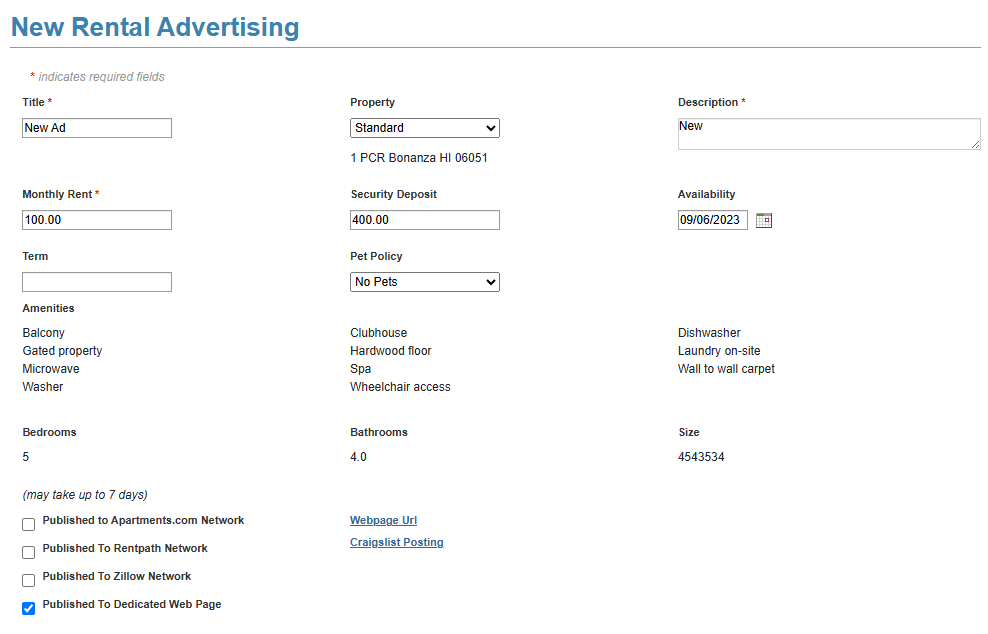
Vacancy Advertisement – You want to be able to create an eye-catching advertisement that gets published on major rental websites so you get the maximum number of qualified applicants for that property.

Vacant Unit Rental Advertisement

Rental Application – You want to be able to have a legal rental application (supplied by the system or use your own) that is online and supports e-signature. You should also be able to collect application fees online.

Rental Application

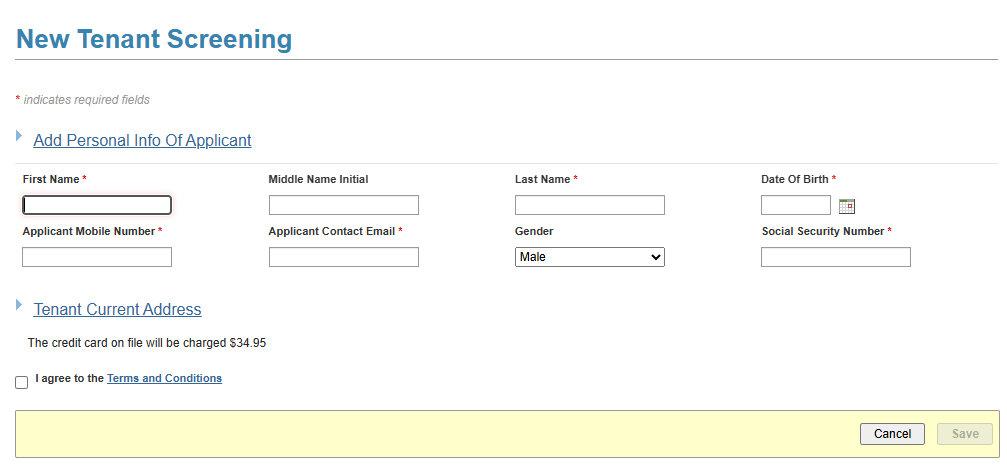
Tenant Screening – You should be able to get a full credit, criminal and eviction history report on any applicant to make sure it matches what their rental application depicts.

Tenant Screening

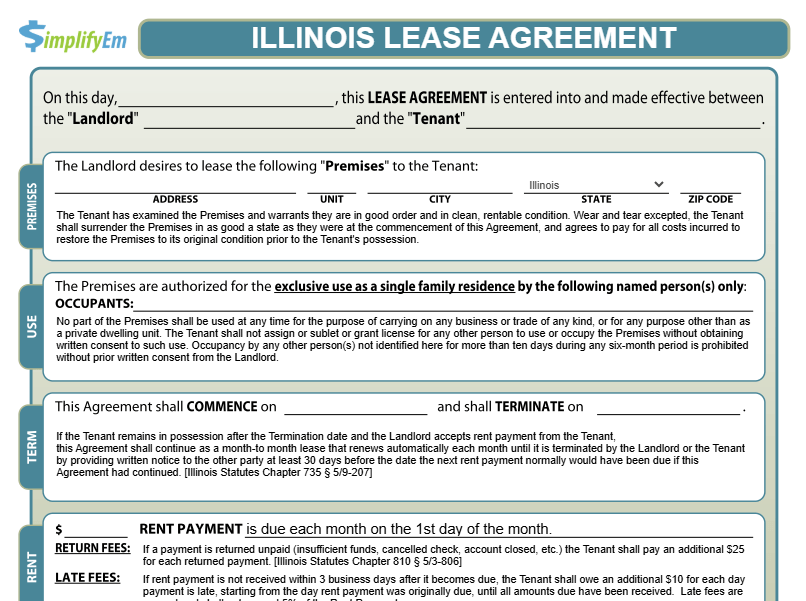
Legal Lease – You want to be able to have available a legal lease appropriate to your state (supplied by the system or use your own) that is online and supports e-signature. You should also be able to collect security deposits online.

Lease Agreement

Turnover unit – You want to be able to manage all vendors and quickly turnover units, completing all cleaning and repairs as fast as possible to make the property rentable quickly.

Move-In form – Finally, you want a legal form agreement between the property manager and tenant as to the state of the property as they move in. So it’s clear any damage done by the tenant after move-in is their responsibility.

Managing active tenants

When you have a tenant in a unit, the main focus becomes collecting rent on time, maintaining accurate bookkeeping on the tenant’s balance, and communicating with the tenant about rent status or any property maintenance issue. SimplifyEm can help you each step of the way.

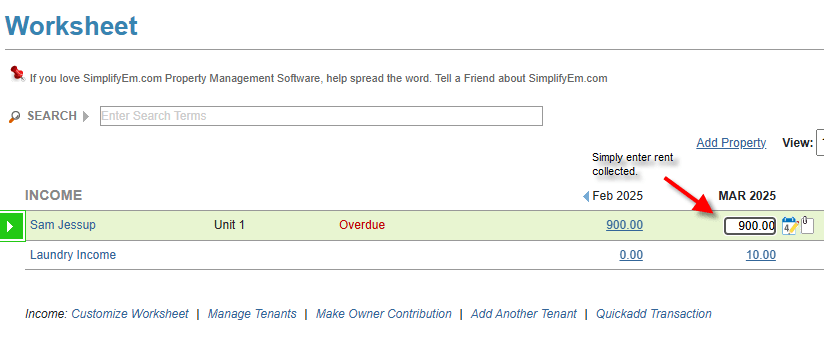
Collect and record rent – The most important task with an active tenant is to collect their rent and record it in your bookkeeping system.

Record Rent Collection

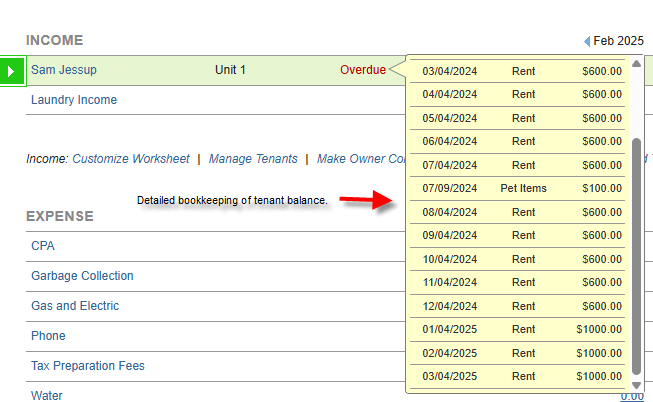
Accurate tenant balance bookkeeping – Once money is collected, you should have accurate bookkeeping of what it’s for and what is still owed. Did you know April rent and April late fees are still owed? If you ever go to court, you have to be able to show exactly what the tenant owes you money for: Which month rent is still owed? Are there Late fees owed? Are their expenses charged to tenants that have not been paid? You need a system that can easily detail this out.

Tenant Balance Bookkeeping

Communication with tenants – You need the ability to communicate with your tenants in multiple ways: email/SMS/Phone and have historical recording of all communications in a single place. The ability to use standard forms for communicating with tenants, such as tenant invoices, rent receipts, late rent notices, notice to vacate, lease renewal notices, is critical.

Communication Center

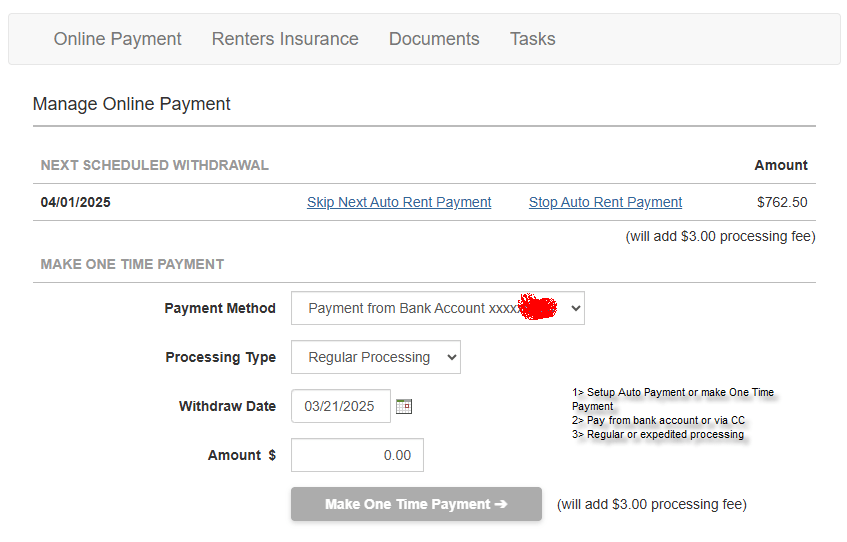
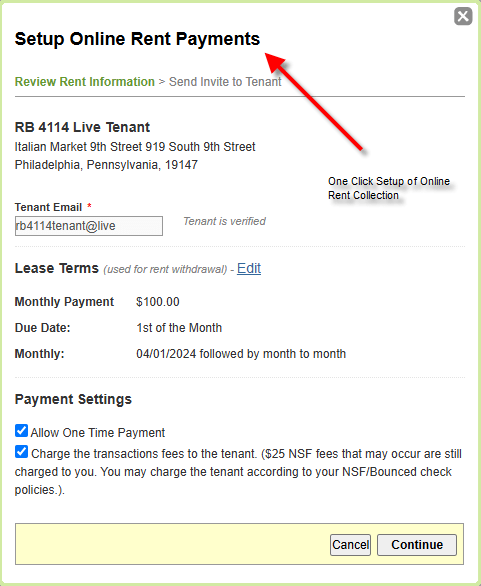
Online Rent Collection – Using paper checks is becoming less popular. More tenants want the ability to pay online via ACH or Credit Card. Also, if it can be set up to be automated based on the lease terms so neither the tenant nor property manager has to do anything and rent always gets deposited on time, that is a great service to provide.

Online Rent Collection

Moving out tenants

One of the most critical phases of managing a tenant is when they’re leaving your rental property. You have to make sure you refund the appropriate security deposit back to them, with bullet-proof accounting of any money you’re keeping and exactly what it’s for. You have also made sure to record exactly that status of property in a move out report with signatures from the property manager and tenant. Simplifyem can help you each step of the way.

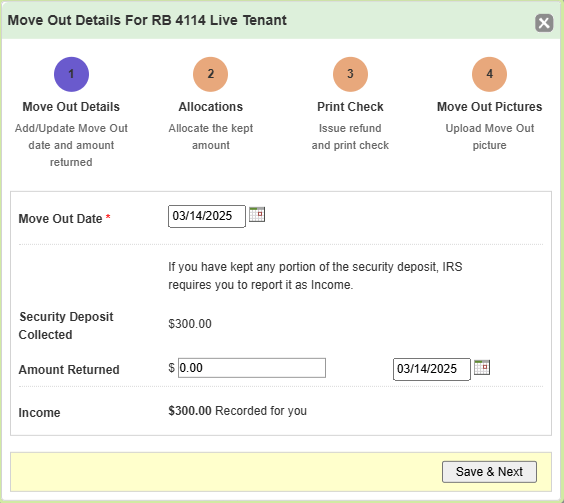
Move Out Tenant – To move out the tenant in a legal manner, you have to record the exact date of move out, how much security deposit you’re returning, and how much of the security deposit you’re keeping. With detailed bookkeeping of exactly what the money you’re keeping is being used for.

Move Out Tenant

Move Out Picture and forms – You should record exactly the state of the property when the tenant moved out and a signature from you and the tenant.

SimplifyEM is a cost-effective and easy to use property management software, that provides all aspects of tenant management:

  • Rental Listing
  • Rental Application
  • Tenant Screening
  • Lease Forms
  • Tenant Bookkeeping
  • Online Rent Payment
  • Tenant Communication

Frequently Asked Questions (FAQs) On Lease Management Software

  • What is lease management software?

    Lease management software helps you automate all aspects of dealing with tenants. Starting from when they move-in, to when they’re living in the unit, and finally when they move out.

    It should make your property management tasks easier and also make sure you’re in legal compliance. It should help you deal with all the scenarios you could have to deal with your tenants.

  • What key features should lease management software have?

    Tenant and lease management software should deal with the full lifecycle of managing tenants:

    • Finding a tenant for a vacant property
    • Managing a tenant in an occupied property.
    • Moving out a tenant from a rented property.

    Some of the key events the lease management software should be able to handle are:

    • Advertise vacancy
    • Rental application
    • Tenant screening
    • Legal lease forms
    • Move in forms
    • Collecting and recording rent
    • Online rent collection
    • Tenant balance bookkeeping
    • Tenant Communication with legal forms (rent invoice, rent receipts, late rent notice, notice to vacate)
    • Move out forms
    • Security deposit dispensation

Sources:

https://selfhelp.courts.ca.gov/eviction-landlord

https://www.mysmartmove.com/blog/true-cost-eviction


Comprehensive Guide to Appliance Management for Rental Properties

Filed Under: Property Maintenance, Property Management, Property Management Software

If you’re a property manager, there are some key decisions you need to make regarding appliances in your rental property:

  • What is considered an appliance?
  • What appliances are you required to provide according to your state laws?
  • What appliances will you be providing to get the best market rent?
  • What responsibilities do you or your tenants have to maintain and repair appliances?
  • What is the best maintenance plan for your appliances?

What is considered an appliance in a rental property?

An appliance is generally an electrical or gas-powered device for tenant usage. Appliances you provide are determined by what’s required by your state and also what is stipulated in your lease.

What appliances are you required to provide?

Typically, appliances you are required to provide are determined by state law. There are typically three groups of appliances:

  1. Legally required
  2. Commonly provided
  3. Luxury apartments or Furnished Apartments

Legally required – are minimal to ensure the rental property is habitable:

  • Heating system
  • Hot and cold water
  • Functional plumbing and electrical
  • Smoke and carbon monoxide detectors

Commonly provided – while they are not legally required, most landlords provide these to be competitive:

  • Refrigerator
  • Stove/Oven
  • Microwave
  • Dishwasher
  • Washer & Dryer
  • Air conditioning

What types of Appliances should be supplied for Furnished Finders or Luxury Apartments?

Tenants expect more appliances and higher-end appliances. So beyond the required and commonly provided appliances, here are some other appliances that would typically be expected:

  • Coffee Maker
  • Toaster Oven
  • Blender
  • TV
  • Vacuum Cleaner
  • Hairdryer
  • Wine Cooler
  • Ceiling Fans
  • Built-in Sound System

What types of appliances should be supplied for a studio apartment?

Studio apartments are smaller, so space efficiency is at a premium. You would typically supply compact, space-saving appliances. You would typically provide what’s legally required and commonly provided appliances.


Who is responsible for appliance maintenance, property manager or tenant?

The final authority of who is responsible for what is based on your state laws and what the lease stipulates.

In general, here is how the responsibilities are divided.

Property Manager Responsibilities:

  • Provide and maintain essential appliances.
  • Fix normal wear and tear issues
  • Ensure Habitability – (heat working, hot water, electricity and functioning plumbing).

Tenant Responsibilities:

  • Cleanliness of appliances
  • Report issues right away
  • Damage caused by misuse (break fridge shelves, overload dishwasher)

Lease-specific clauses can shift responsibilities:

  • Minor repairs could be specified as tenant responsibilities
  • Unfurnished apartment with tenant required to supply and maintain appliances
  • Luxury apartment with maintenance services included for premium rent.

Best way to manage appliances – Have an appliance inventory list with a maintenance plan.

What is an appliance inventory list?

An appliance inventory list is a detailed record of all appliances in your rental property with all pertinent information. As a property manager it’s a best practice for you to have one. It would typically have information like type of appliance, brand, purchase date, life expectancy, condition, maintenance plan, and maintenance history for each appliance.

Having an inventory list helps you in the following ways:

  • Track appliance condition and lifespan – helps you plan for its lifetime, plan proactive maintenance.
  • Avoid disputes – document what appliances and what condition appliances were provided to tenants.
  • Create maintenance plans – identify warranty status, schedule maintenance and order spare parts.
  • Plan purchase of appliances – knowing their lifespan, you can budget and plan purchase for replacements.

Here is a sample appliance inventory list:Appliance Inventory List

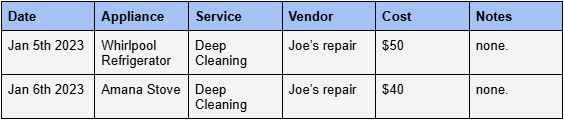
Here is a sample appliance service history list:Appliance Service History List


What is the best maintenance plan for your appliances?

A good maintenance plan is required to make sure your appliances are working efficiently and to prevent major issues. Based on recommendations from the Department of Energy and Environmental Protection Agency. It should consist of:

  • Regular cleaning
  • Scheduled inspections
  • Preventative maintenance on a daily, weekly, monthly, quarterly and annual basis as required.
  • Regular replacement of parts that get used up (batteries, filters …)
  • Emergency repair as needed

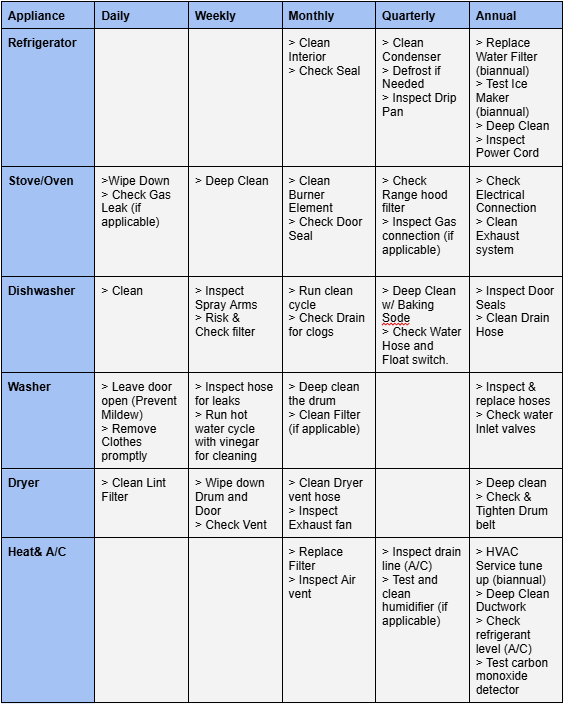
Appliance Maintenance Plan:Appliance Maintenance Plan


Once you’ve determined the maintenance plan for your appliances as a property manager, you should have clear communication about the tenant’s responsibilities. You should also make sure that the lease conveys this information.


How can SimplifyEm help you maintain your appliances in your rental property?

The key to maintaining your appliance is:

  • Having a maintenance plan with specific dates and tasks, which you can do with the task center in SimplifyEm
    Having a ready list of vendors to help deal with repair issues, which you can manage via the vendor center in SimplifyEm.

Frequently Asked Questions (FAQs) about Appliance Maintenance

  • What are appliances that a property manager is required to have in a rental property by law?

    Since laws that govern this tend to be local, you should investigate your state laws. In general, you have to provide a habitable property so basic things like heating, hot water, functional plumbing and electrical are required by law.

  • What are common appliances that are expected by most tenants?

    Beyond what’s required by law, most tenants would expect basic appliances in the kitchen such as stove/oven, refrigerator, and dishwasher. Also many times they would expect access to washer/dryer in-unit or in the building. If you’re in a hot climate, air conditioning can become a high priority.

  • What is a good way to manage the appliances in a rental property?

    You should create and manage a list of appliances you’re supplying for the rental property, as well as a maintenance plan for each appliance.

    With clear communication as to the tenant’s as well as property manager’s responsibilities in executing the maintenance plan.

Sources:

https://www.energy.gov/eere/buildings/appliance-and-equipment-standards-program

https://www.epa.gov/watersense/home-maintenance

  • « Go to Previous Page
  • Page 1
  • Page 2
  • Page 3
  • Page 4
  • Page 5
  • Interim pages omitted …
  • Page 19
  • Go to Next Page »

Primary Sidebar

SimplifyEm
Streamline Your Property Management

Schedule A FREE Demo

Table Of Contents

SimplifyEm

  • Property Management Software
  • SimplifyEm Reviews
  • About Us
  • Pricing
  • SimplifyEm CRM
  • Terms and Conditions
  • Privacy Policy
  • SimplifyEm Security

Features

  • Property Management
  • Online Rent Payments
  • Affordable Tenant Screening
  • Rental Listing
  • Request Demo
  • Accounting Software
  • Reconciliation
  • Tenant Screening
  • 1099 eFiling Feature
  • Reports
  • Communication Center
  • Integrated Rental Application
  • Rental Listing
  • Online Rent Payments
  • Tenant Portal
  • AI in Property Management

Forms

  • Lease Agreement
  • Notice To Quit
  • Notice To Pay Rent
  • Rental Application
  • Rental Inspection
  • Lease Termination
  • Eviction Notice

Resources

  • Blog
  • Property Management Companies
  • Law
  • Buzz
  • FAQ

Company

  • Contact Us
  • Support
  • Press And Media
  • Career


SimplifyEm Property Management Software Logo

Follow us

Facebook Instagram Twitter LinkedIn YouTube

Download App

Google Play App Store
SimplifyEm Google Reviews - Rated 4.8 out of 5 SimplifyEm G2 Reviews - Rated 4.7 out of 5 SimplifyEm Software Advice Reviews - Rated 4.8 out of 5 SimplifyEm Capterra Reviews - Rated 4.7 out of 5

Copyright © 2025 SimplifyEm Inc. · All rights reserved.

Get Your Lease Agreement Form in Just One Step

I am a: