• Skip to primary navigation
  • Skip to main content
  • Skip to primary sidebar
SimplifyEm Property Management Software Logo

510-790-9066
510-790-9066
》Sign In
  • Features
    • Accounting Software
    • Reconciliation
    • Tenant Screening
    • 1099 E-filing
    • Reports
    • Communication Center
    • Integrated Rental Application
    • Rental Listing
    • Online Rent Payments
    • Tenant Portal
    • AI in Property Management
  • Property Management
    • Online Rent Payments
    • Tenant Screening
    • Rental Listings
    • SimplifyEm CRM
    • FAQ
  • Rental Forms
    • Lease Agreement
    • Rental Application
    • Notice to Vacate
    • Notice to Quit
    • Lease Termination
    • Notice to Pay Rent
    • Rental Inspection
    • Eviction Notice
  • Pricing
  • Reviews
  • Schedule Demo
  • FREE TRIAL!
  • 》​Sign​ In

Property Management Software

When to Switch Property Management Software: 7 Clear Signs

Filed Under: Property Management Software Tagged With: Landlord Software, Property Management Software, property management workflows, software comparison

When to switch property management software
Switching property management software makes sense when your current system adds friction instead of saving time.

If your team keeps asking when to switch property management software, the answer is usually hidden in everyday work. Reports take too long, staff rely on spreadsheets, and communication gets scattered across inboxes, texts, and side notes. Those problems do more than waste time. They also create errors, slow responses, and weaken the experience for owners and tenants.

This guide explains seven clear signs that your current platform no longer fits your operation. It also shows how to evaluate the next system before you commit. The goal is not to chase more features. The goal is to choose software that supports accounting, rent collection, reporting, maintenance, and communication with less manual work.

Quick Takeaways

What this article covers

  • Software should reduce admin work, not create side systems.
  • Manual workarounds, weak reporting, and poor support are common warning signs.
  • The best time to switch is before software issues hurt tenants, owners, or staff output.
  • A better platform should fit your current workflows and leave room for growth.
  • Careful evaluation lowers the risk of switching to another poor fit.

Definition: What It Means to Outgrow Your Software

Simple definition

You have outgrown a platform when it no longer supports the way your business actually runs. That does not always mean the software is bad. It often means your portfolio, reporting needs, staffing, or daily workflows have changed faster than the tool can support them.

In practice, outgrowing software usually means more work is happening outside the system than inside it. Teams start building spreadsheets, repeating manual steps, or tracking key tasks in email and text because the platform no longer keeps pace with daily work.

  • reports require exports and cleanup
  • staff repeat the same steps every month
  • owner or tenant communication lacks one clear history
  • basic tasks take too many clicks
  • growth adds confusion instead of clarity

Why Staying Too Long Can Cost More

Hidden costs of delay

Many property managers delay a switch because they expect migration pain. That concern is reasonable, but staying with the wrong system has a cost too. Small workflow problems become recurring labor costs when they happen every day.

Those costs often show up in extra bookkeeping time, slower owner reporting, missed follow-up, duplicate data entry, and training issues for new staff. A tool that slows routine work can cost more over a year than a planned transition to a better fit.

Problem Area What It Costs You
Manual spreadsheets More time, more errors, and weaker visibility
Weak reporting Slower owner updates and harder month-end work
Fragmented communication Missed follow-up and inconsistent records
Slow support Longer outages and more team frustration

When to Switch Property Management Software: 7 Signs

Sign-by-sign review

If you are wondering when to switch property management software, these are the warning signs to watch. One issue may be manageable. Several happening at once usually mean the platform no longer fits your business.

1. Your team relies on manual workarounds

This is often the earliest sign of poor software fit. Instead of using one platform, your team starts exporting reports, maintaining side spreadsheets, and tracking tasks in outside tools.

  • owner notes live in separate documents
  • rent reminders are tracked manually
  • maintenance updates happen outside the system
  • staff use email threads instead of one record

When that happens, the software stops being a system of record. It becomes one more place to check.

2. Reporting is too limited or too slow

Reporting problems create pressure fast. Owners expect clear statements. Teams need accurate rent rolls, delinquency views, and transaction records. If your software makes simple questions hard to answer, it is blocking decisions instead of supporting them.

For tax context, the IRS provides a helpful overview of Schedule E reporting. While that page does not evaluate software, it helps show why complete rental records matter.

3. Your portfolio has changed but the software has not

A system that worked for a smaller portfolio may feel too limited once you add units, owners, staff, or more detailed reporting requirements. Growth changes what “good enough” looks like.

If complexity increases and the platform still feels built for a much simpler operation, switching becomes easier to justify.

4. Support is slow or hard to reach

Support quality matters in property management because problems do not wait. If your team cannot get clear answers during payment issues, onboarding, or month-end reporting, the platform becomes riskier over time.

Reliable support is part of product fit. It is not just a nice extra.

5. Communication feels fragmented

Communication breaks down when tenant, owner, and vendor conversations are spread across separate systems. That makes follow-up harder and weakens team visibility.
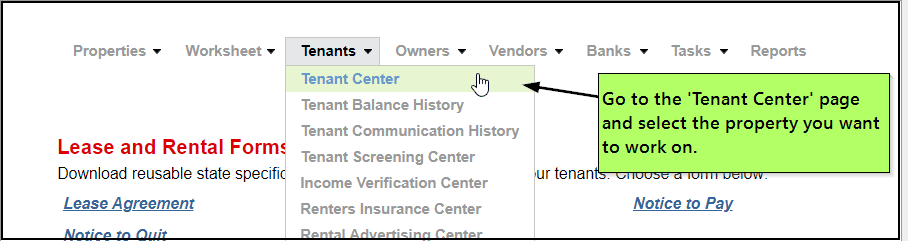
Tenant portal and communication tools
Centralized communication reduces the risk of missed updates and scattered records.

6. Basic tasks feel harder than they should

Sometimes the features exist, but daily use still feels clumsy. If common tasks take too many clicks, require repeated training, or confuse new staff, that friction adds up every week.

Usability matters because property management is high frequency work. Small delays repeat across every property and every rent cycle.

7. Pricing no longer matches value

Some teams outgrow low-tier plans and discover that needed functionality sits behind upgrades. Others pay for broad feature sets they barely use. In both cases, the platform is misaligned with the actual business.

If pricing and workflow value no longer match, it is time to compare alternatives more seriously.

A Simple Checklist Before You Decide

Fast self-audit

Use this short checklist to decide if the switching question is becoming urgent.

  • your team uses spreadsheets to fill software gaps
  • reporting takes too long every month
  • owner or tenant communication feels scattered
  • new staff need too much training for simple work
  • support delays are affecting operations
  • pricing feels out of line with actual value

If several items are true at the same time, it is usually time to evaluate better-fit options.

How to Evaluate the Next Platform

Step-by-step review process

Do not switch just because you are frustrated. Switch because a better option clearly solves your current problems. A short evaluation process can prevent one bad fit from becoming another.

  1. List your biggest workflow problems.
  2. Separate must-have fixes from nice-to-have upgrades.
  3. Test reporting, rent collection, maintenance, and communication tasks.
  4. Ask what onboarding and support are included.
  5. Compare total workflow value, not just subscription price.

If you want to review a live example, you can look at SimplifyEm’s features and pricing to compare workflow coverage and plan fit.

What a Better Fit Should Include

Core capabilities to review

A stronger platform should make routine work simpler, clearer, and easier to track. It does not need the longest feature list. It needs the right set of tools for your current operation.

  • clean accounting and income-expense tracking
  • online rent collection
  • tenant and lease management
  • owner reporting
  • maintenance request tracking
  • document storage
  • clear communication history
  • responsive onboarding and support

If you are already convinced a move is coming, the next step is planning the transition itself. This companion guide on how to switch property management software covers the migration side.

FAQ: When to Switch Property Management Software

Common questions

  • How do I know if I have outgrown my property management software?

    You have likely outgrown it when daily work depends on spreadsheets, repeated manual steps, slow reports, or scattered communication. A good platform should centralize routine work. If your team keeps building side processes to get basic tasks done, your current system is probably no longer a good fit.

  • When is the best time to switch property management software?

    The best time to switch property management software is before recurring system problems start affecting rent cycles, owner reporting, tenant communication, or staff output. Switching early is usually less disruptive than waiting until errors, support delays, and workflow bottlenecks become operational problems.

  • Is switching software always necessary when a team is frustrated?

    No. Some issues come from poor setup, weak training, or underused features. That is why a short evaluation matters. If the main problems come from workflow mismatch, limited reporting, or poor support, then a software switch may be the more practical answer.

  • What should I compare when reviewing replacement platforms?

    Focus on the work your team does most often. Review accounting, rent collection, maintenance, owner reporting, communication history, onboarding, and support responsiveness. A platform should make high-frequency tasks easier. It should not just look good in a feature checklist or sales demo.

  • Can smaller landlords benefit from switching software too?

    Yes. Smaller landlords switch when they want simpler accounting, easier online rent collection, clearer records, or less time spent on admin work. The right fit is not about being large. It is about whether the platform supports your actual workflows without adding unnecessary friction.

Conclusion: Switch Before Friction Becomes Normal

Final recommendation

Knowing when to switch property management software comes down to one simple test: is your current system making daily work easier or harder? If reporting is slow, communication is scattered, support is weak, or your team depends on manual workarounds, the software is likely costing more than it saves. That is usually the point where staying put becomes the riskier option.

The best replacement will fit your current portfolio, improve routine workflows, and support growth without forcing constant side processes. If you are ready to compare options, review SimplifyEm’s features and pricing or start a free trial to see whether the platform is a better operational fit for your team and portfolio.

Sources:
  • IRS – About Schedule E (Form 1040)
  • National Association of REALTORS – Property Management Resources

SimplifyEm vs Stessa: Which Property Management Software is Best for You?

Filed Under: Business Management, Features, Property Management, Property Management Software

In 2025, property managers and landlords alike are relying on software to streamline their operations, automate financial tasks, and prepare for growth. Two recognized platforms—SimplifyEm and Stessa—serve different audiences, but both aim to make managing rentals easier.
So how do they compare? Below, we break down features, pricing, support, and ideal use cases to help you decide which software is the right fit.

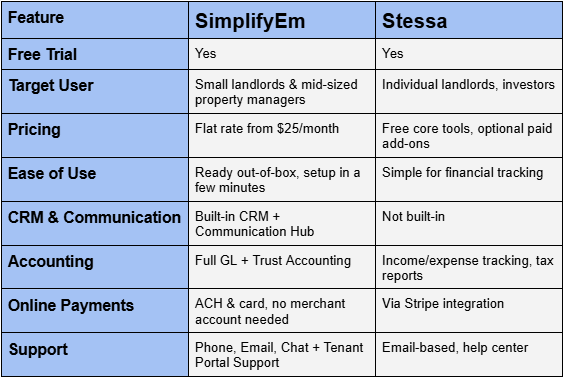
SimplifyEm vs Stessa: Feature Comparison Table

Stessa SimplifyEm Product Comparison


Designed to Help You Scale—Starting Small

SimplifyEm is built for both small landlords and mid-sized property managers. Whether you manage 5 units or 500, the system scales with your business. It provides robust tools like accounting, CRM, and automated communications—all without overwhelming you with complexity.

Stessa, by contrast, is purpose-built for individual real estate investors focused on portfolio performance and financial tracking. It’s ideal for landlords who need high-level income/expense insights without managing a large number of tenants.

If you’re a small landlord today, but plan to grow, SimplifyEm is built to grow with you—unlocking features as your portfolio expands without switching platforms.

Ease of Use and Setup

SimplifyEm can be set up in a few minutes. With a streamlined interface and automation baked into everyday workflows, you’ll spend less time in the software—and more time running your business.

Stessa also emphasizes ease of use, especially for tracking property-level finances and preparing for tax season. Its dashboard is tailored to investor metrics, not tenant management.

Pricing Comparison

  • SimplifyEm starts at just $25/month with no extra charge for core features like trust accounting, CRM, or support.
  • Stessa is free for most users, with optional paid features like rent collection via Stripe, premium banking, or document storage.

Explore SimplifyEm’s pricing here.

Communication & CRM Capabilities

SimplifyEm includes a powerful CRM and Communication Hub to help you:

  • Track leads and prospects
  • Automate lease renewals and follow-ups
  • Send SMS and email reminders
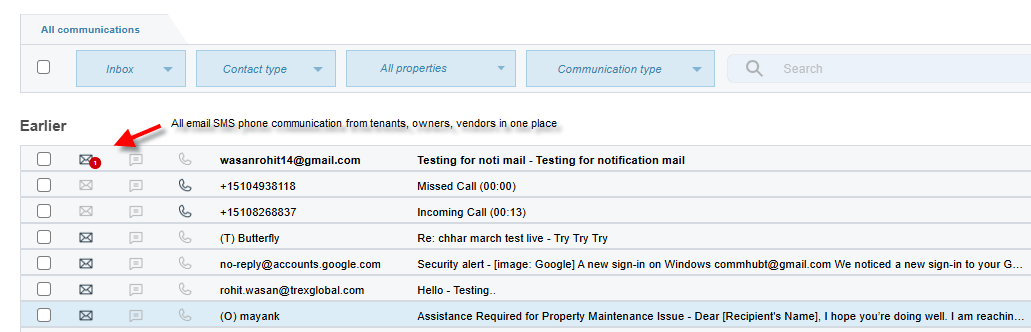
  • Keep all conversations in one timeline

While Stessa excels in financial reporting, it doesn’t include built-in communication tools or CRM features.

See how SimplifyEm helps with tenant communication.

SimplifyEm Communication Center

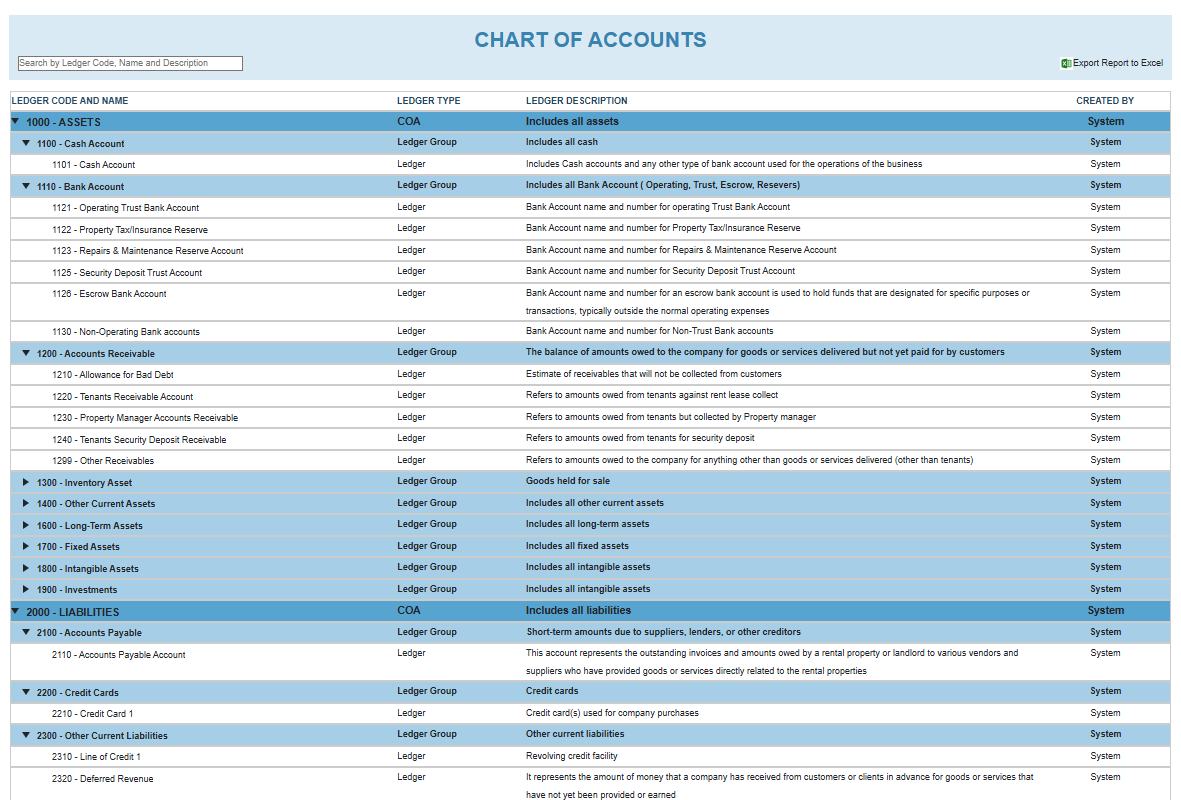
Accounting Features

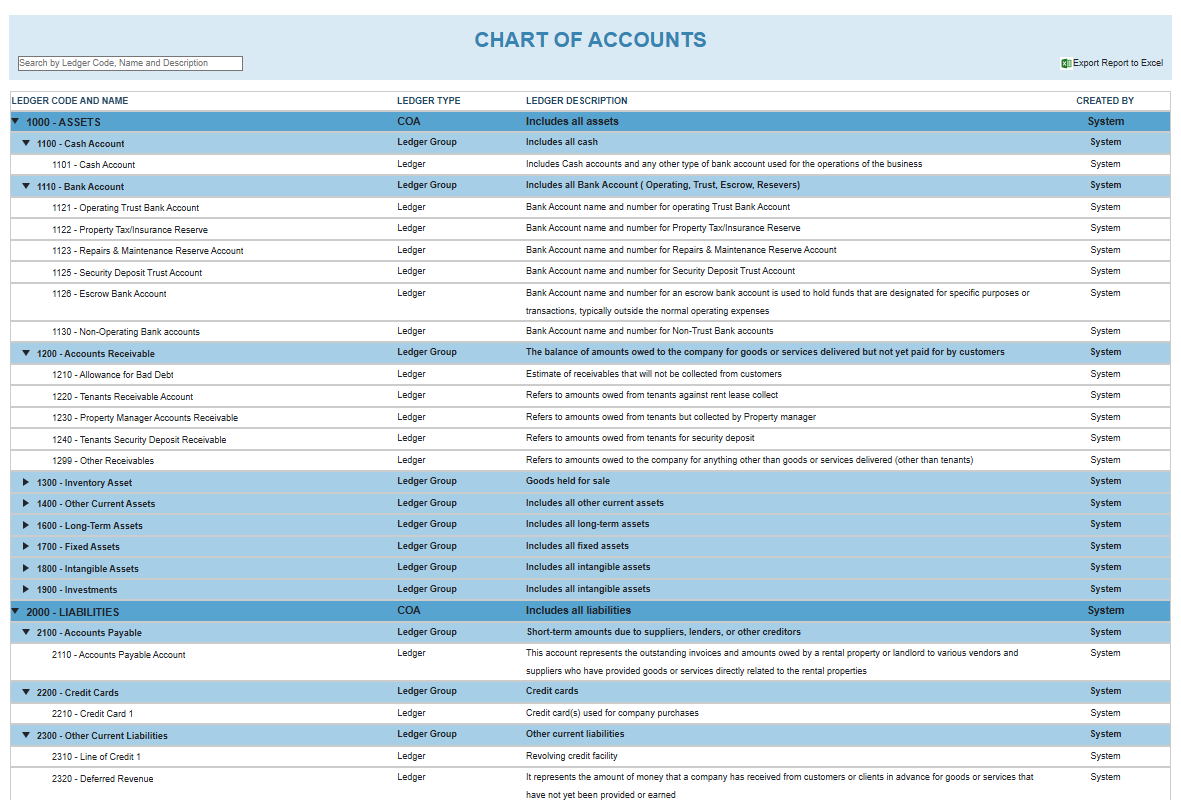
  • SimplifyEm offers full General Ledger (GL) accounting, trust fund tracking, bank reconciliation, and owner statements.
  • Stessa focuses on financial insights, including income/expense tracking and tax-ready reporting.

For detailed accounting needs and compliance (especially trust accounting), SimplifyEm provides stronger support for those use cases.

Explore SimplifyEm’s accounting capabilities.

SimplifyEm Chart of Accounts

Online Rent Collection

SimplifyEm enables rent collection through ACH or credit card, with features like:

  • Recurring payments
  • Automatic late fee calculation
  • Instant ledger updates

Stessa offers rent collection through Stripe integration, which may require setup and processing fees.

Learn more about SimplifyEm’s payment tools.

Customer Support and the “Customer WOW” Experience

One of SimplifyEm’s standout advantages is its live support. Users can get help via:

  • Phone
  • Email
  • Chat
  • Even tenants can call in for assistance on the tenant portal

This is part of what SimplifyEm calls its “Customer WOW” experience—prioritizing real human help over ticket queues. It’s one of the reasons customers stay loyal.

Stessa offers support via email and a help center designed for self-service, which works well for users comfortable managing everything solo.

Final Verdict: Which One Should You Choose?

Choose SimplifyEm if you:

  • Are a small landlord planning to grow
  • Need full accounting, CRM, and communication tools
  • Value phone support and hands-on help
  • Want predictable, affordable pricing

Choose Stessa if you:

  • Are an individual investor focused on tracking ROI and property finances
  • Prefer a free tool with optional premium add-ons
  • Don’t require CRM or in-app communication

For property managers and landlords ready to scale operations and simplify management, SimplifyEm is the best long-term partner.

FAQ (Frequently Asked Questions) SimplifyEm Stessa Comparison

  • Is SimplifyEm good for small landlords too?

    Yes! SimplifyEm is perfect for small landlords who want to scale, offering powerful tools without complexity.

  • Does Stessa have built-in tenant communication?

    No, Stessa does not include CRM or messaging tools. Communication must be handled externally.

  • Can tenants call SimplifyEm for help?

    Yes! Tenants can call SimplifyEm for assistance with their portals—part of their Customer WOW support model.

  • Is SimplifyEm easier to scale with than Stessa?

    Yes. SimplifyEm is designed to grow with you, with features that unlock as your portfolio expands.

  • Is rent collection available on both platforms?

    Yes. SimplifyEm offers built-in rent collection, while Stessa offers it through Stripe integration.

Sources:

U.S. Small Business Administration – Rental Property Management Guide
https://www.sba.gov/blog/how-manage-residential-rental-property

HUD – Resources for Landlords and Property Managers
https://www.hud.gov/program_offices/housing/mfh/hsgrent

Property Management Software for Apartments vs Condos vs Commercial Units: What’s the Difference?

Filed Under: Business Management, Features, Property Maintenance, Property Management, Property Management Software, Tenant Management

Not all properties are managed the same way—and not all software is built to handle every property type equally well. Whether you’re managing an apartment building, a self-managed condo association, or a handful of commercial spaces, the tools you use need to match your operational and reporting needs.

This article breaks down the differences between managing apartments, condos, and commercial units—and how software like SimplifyEm, built for long-term residential property management, can still support HOAs and small commercial portfolios with ease.

Key Differences in Property Management Software for Apartments, Condos, and Commercial Properties

Apartments – Lease-Driven Residential Management

Managing apartments means focusing on tenants, lease cycles, and rent collection. These properties often have:

  • High tenant turnover
  • The need for lease renewals and rent reminders
  • Frequent unit-level maintenance
  • Automated late fees and recurring charges

Condos – Association-Focused and Owner-Driven

Condominium management usually involves working with owners and HOA boards rather than tenants. Key needs include:

  • Monthly or quarterly HOA dues
  • Shared area maintenance
  • Document sharing (rules, CC&Rs, financials)
  • Transparent communication with board members and owners

Commercial Units – Complex Lease Terms and Vendor Coordination

Commercial property managers deal with unique challenges like:

  • Triple Net (NNN) leases, CAM charges, and rent escalations
  • Managing tenants like offices, retail, or warehouse users
  • Suite-level reporting and lease abstraction
  • Vendor coordination for long-term contracts


Software Requirements for Each Property Type

Property Types Comparison

Property Management Software: SimplifyEm’s Strength in Residential, HOA & Light Commercial Use Cases

Best-Fit: Long-Term Residential Property Management

SimplifyEm is purpose-built for landlords and property managers overseeing long-term residential properties. Ideal for:

  • Apartments, single-family homes, duplexes, and multifamily units
  • Lease tracking, rent collection, recurring charges
  • Automated late fees, rent reminders, and GL-level financial reporting

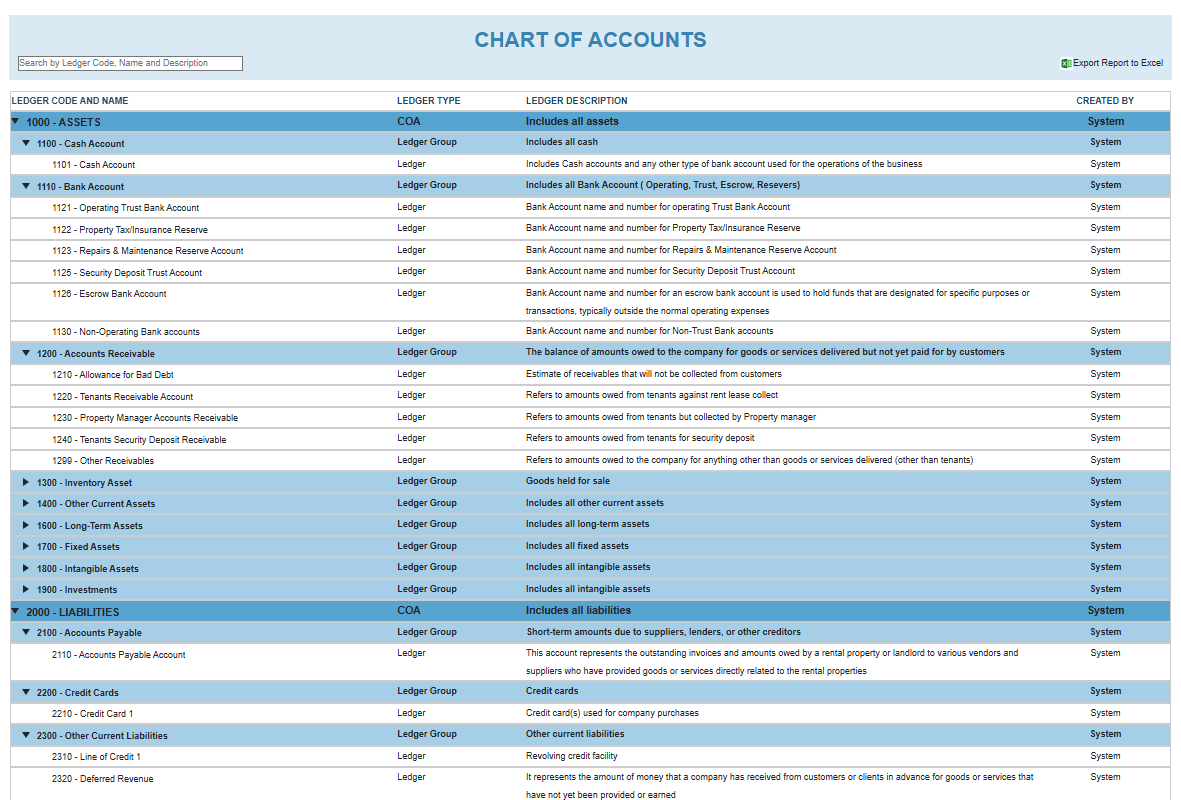
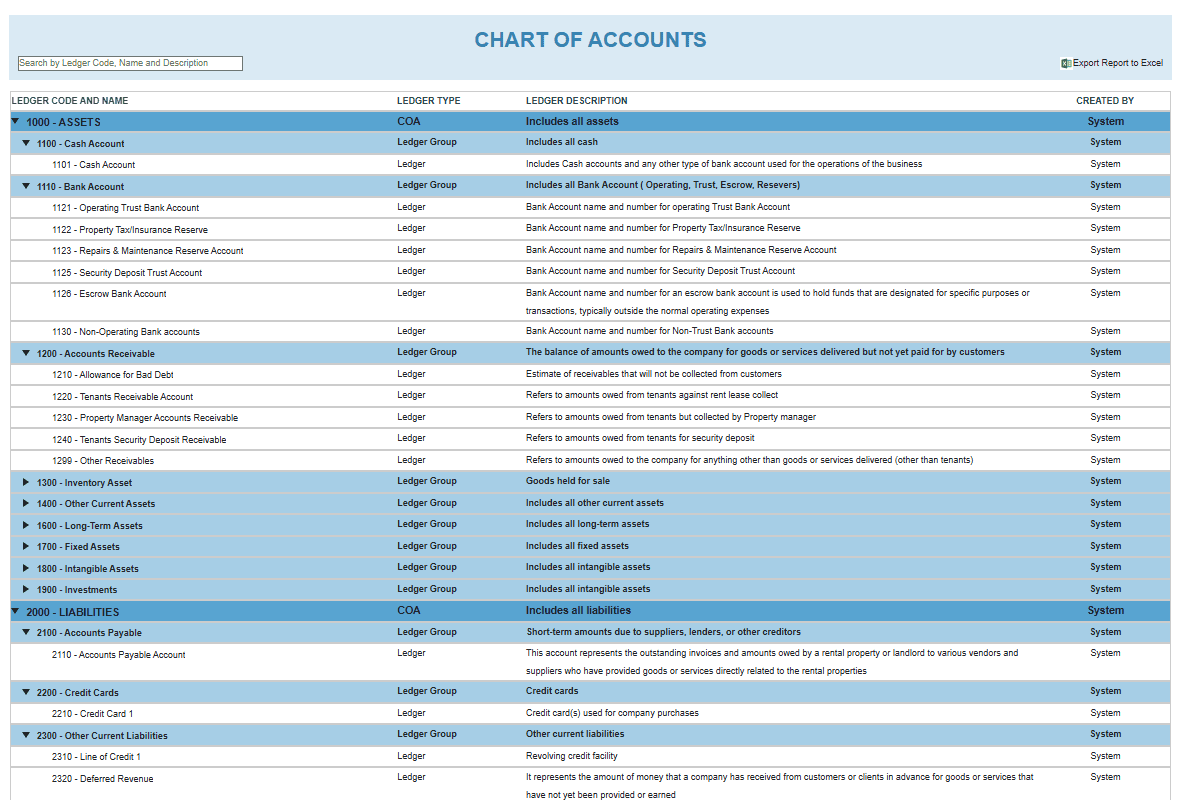
SimplifyEm Chart of Accounts

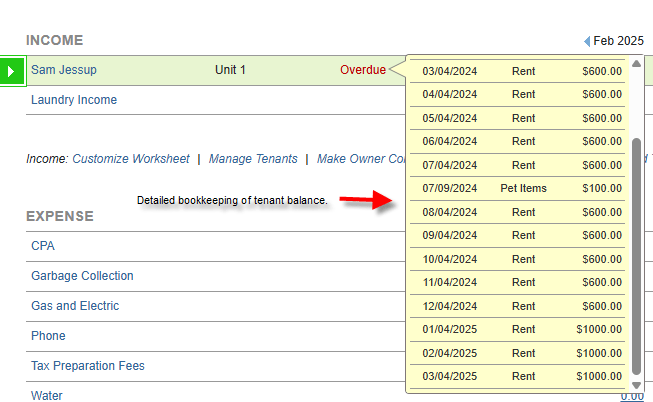
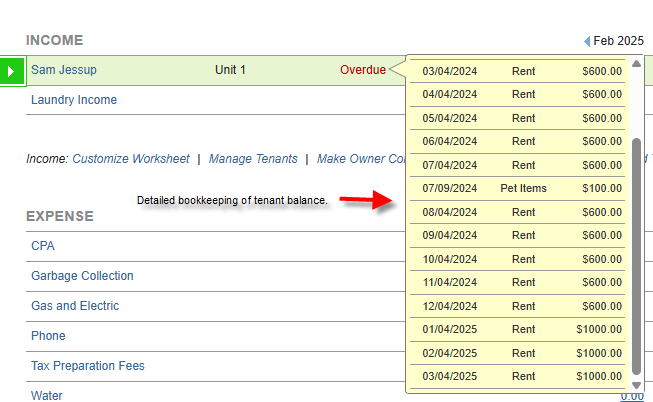
SimplifyEm Tenant Balance Bookkeeping

Explore all residential features

HOA and Condo Managers Use SimplifyEm for Simplicity

While SimplifyEm is not an HOA-specific system, many small condo associations and self-managed HOAs use it due to:

  • Easy dues tracking and payment collection
  • Common area maintenance and service requests
  • Owner communication via message templates
  • No steep learning curve or high costs

Small Commercial Portfolios Can Use It—With Caveats

SimplifyEm isn’t built for institutional commercial portfolios, but many users with 5–30 commercial units use it successfully thanks to:

  • Custom fields for rent escalations or utility charges
  • Basic GL accounting and suite-specific rent tracking
  • Vendor tracking for maintenance and compliance

If you need CAM reconciliation, lease abstraction, or complex escalations, a commercial-specific platform may be better.

One Dashboard for Mixed Residential + HOA or Commercial

SimplifyEm offers flexibility to manage mixed portfolios with:

  • Custom property types, tags, and reporting filters
  • Combined rent rolls and owner statements
  • Role-based access for different types of stakeholders


FAQs – Using Property Management Software for Mixed Portfolios

  • Can I manage condos and apartments in the same system?

    Yes. SimplifyEm lets you manage both through configurable fields and tags. You can track rent, HOA dues, and communication in one place.

  • What does SimplifyEm offer for HOA and small commercial portfolios?

    For small HOAs: dues tracking, messaging, and shared maintenance. For commercial: rent tracking and suite-level customization.

  • Is SimplifyEm ideal for retail/industrial properties?

    Not for large-scale use, but for small portfolios or single-building commercial managers, it’s a cost-effective and easy-to-use option.

  • What are the limitations for commercial lease tracking in SimplifyEm?

    SimplifyEm does not support lease abstraction, CAM reconciliations, or advanced percentage rent modeling.

Final Thoughts: Choosing the Right Property Management Software for Your Property Type

Each property type has unique management needs:

  • Apartments need tools for tenants, leases, and maintenance.
  • Condos/HOAs need dues tracking, document sharing, and owner communication.
  • Commercial properties require advanced lease and financial handling.

SimplifyEm is the right choice for long-term residential management and is often used by small HOAs and commercial portfolios because of its simplicity, flexibility, and value.

Try SimplifyEm free

Can You Use QuickBooks for Property Management? Here’s What You Need to Know

Filed Under: Business Management, Property Management, Property Management Software

Many landlords and property managers wonder if they can use QuickBooks to manage rental properties. After all, it’s one of the most popular accounting platforms for small businesses. But when it comes to property management—tracking tenants, collecting rent, handling maintenance, and producing owner statements—QuickBooks shows its limits.

This article compares QuickBooks directly to SimplifyEm, a platform built specifically for small landlords and mid-sized property managers.

What QuickBooks Does Well for Business Owners

General Accounting Strengths

QuickBooks offers solid features for general business bookkeeping:

  • Double-entry accounting with a full Chart of Accounts (COA)
  • Financial reports and bank reconciliation
  • CPA-friendly exports and tax categorization

These features make QuickBooks a powerful tool—for users with a deep understanding of accounting principles.

Why It’s Not Built for Property Management

QuickBooks was designed for freelancers, consultants, and retail businesses—not property managers or landlords. That means:

  • No built-in tenant or lease tracking
  • No online rent collection tools
  • No maintenance requests or rent reminder workflows

Users must manually customize fields, reports, and ledgers to “fit” rental workflows—often with limited success.

Can Small Landlords and Property Managers Actually Use QuickBooks Effectively?

The Accounting Barrier

To use QuickBooks well for rentals, you need to understand:

  • Chart of Accounts (COA) setup
  • General Ledger (GL) principles
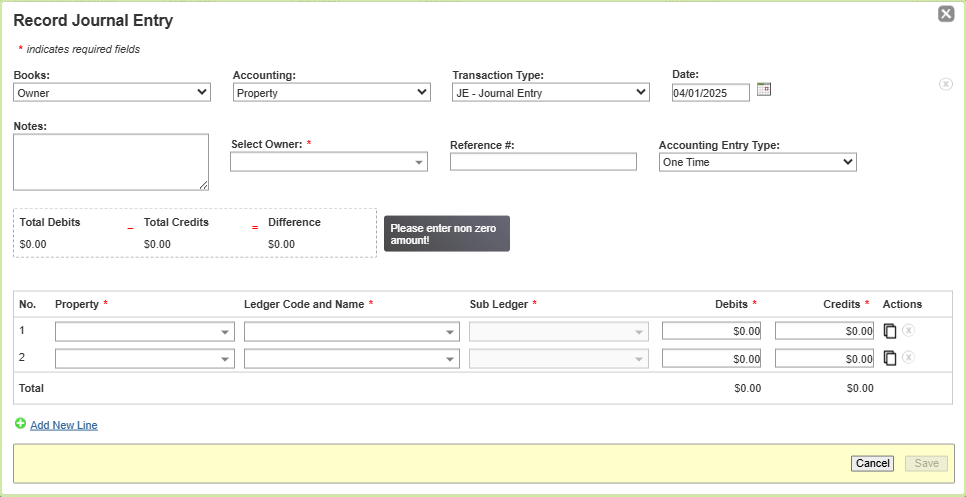
  • Journal entries and double-entry accounting

Most small landlords and even many property managers don’t have that background. Mistakes are common—and costly.

The Result: Confusion and Errors

Without property-specific workflows, users often:

  • Track rent payments manually
  • Forget to post late fees
  • Struggle to reconcile security deposits
  • Rely on spreadsheets outside the system

In the end, many hire bookkeepers just to manage QuickBooks—or abandon it altogether.

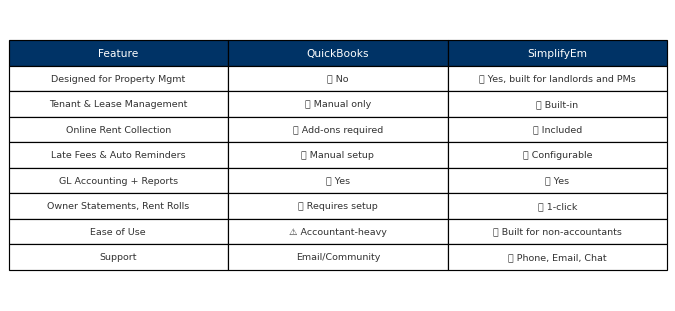
QuickBooks vs. SimplifyEm: Feature-by-Feature Comparison

QuickBooks SimplifyEm Comparison

Why SimplifyEm Is Better for Landlords and Property Managers

Start Simple, Grow With Ease

SimplifyEm lets you start with just the tools you need—like rent tracking and lease reminders—and grow into full GL accounting and CRM as your portfolio expands.

Built for Property Workflows

You can:

  • Track leases and tenants
  • Send rent reminders and charge late fees
  • Accept online payments
  • Generate 1099s, rent roll reports, and owner statements

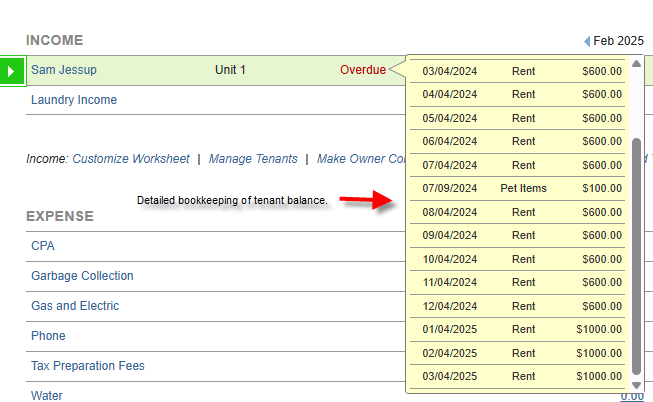
SimplifyEm Tenant Balance Tracking

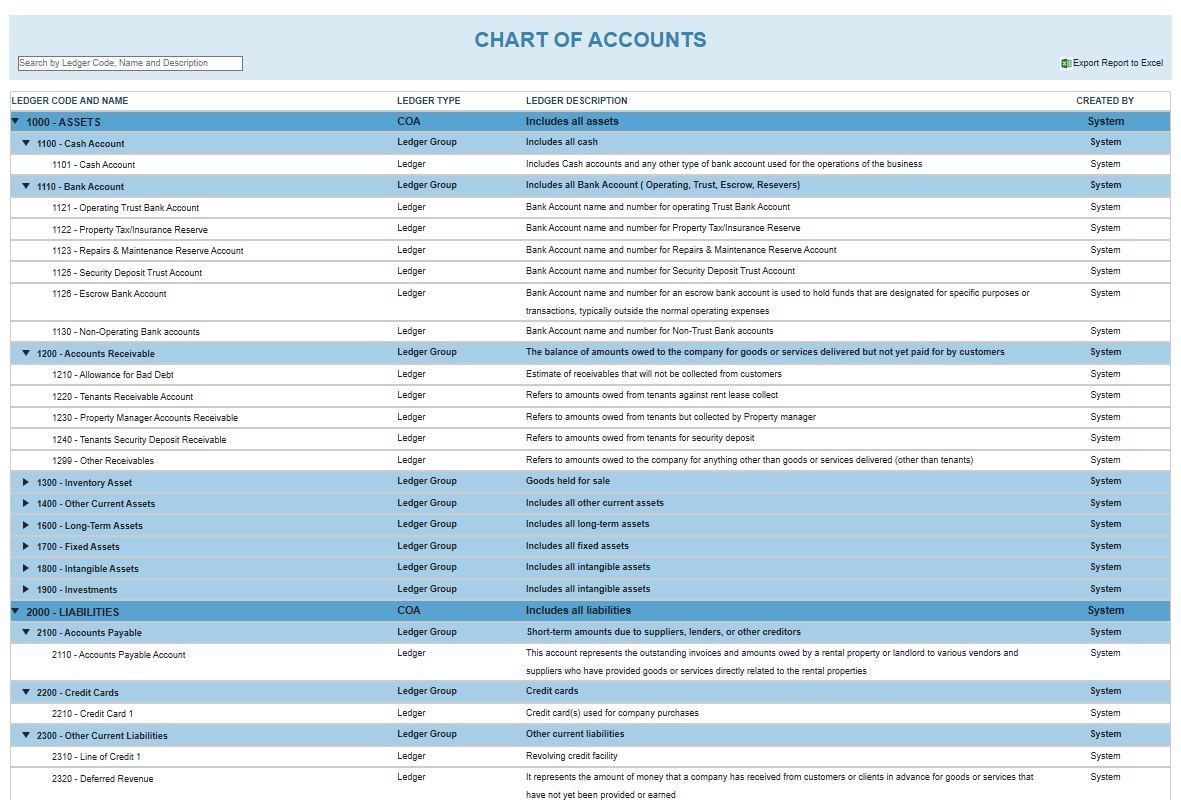
SimplifyEm Chart of AccountsSimplifyEm Journal Entries
All without needing accounting training.

Transparent Pricing, Customer Support that WOWs

  • Plans start at $25/month for up to 10 units
  • No per-unit fees or forced upgrades
  • Support via phone, email, and chat

Explore property management accounting features
Compare pricing plans

FAQs – QuickBooks vs. SimplifyEm

  • Can I use QuickBooks to track rental income?

    Yes, but it requires custom setup, manual tracking, and strong accounting knowledge.

  • Is there a QuickBooks template for landlords or property managers?

    Some third-party templates exist, but they don’t include lease tracking, rent automation, or late fees.

  • Do I need an accountant to use QuickBooks for rentals?

    Most landlords and property managers do. It’s not designed for property management out-of-the-box.

  • What’s the best alternative to QuickBooks for managing rentals?

    SimplifyEm—it includes property accounting, tenant management, and reminders, all without needing accounting experience.

  • Final Thoughts: Is QuickBooks Right for Managing Rental Properties?

    QuickBooks is a powerful accounting platform—but not for rental property management. Landlords and property managers who try to make it work often spend more time customizing or fixing mistakes than actually managing their business.

    SimplifyEm is the smarter choice. It’s designed specifically for small landlords and mid-sized property managers. You can start simple and grow into full-featured GL accounting and CRM—no accounting degree required.

    Start your free trial

    Sources:

    U.S. Small Business Administration (SBA) – Choosing the Right Accounting Software

    Internal Revenue Service (IRS) – Tax Information for Rental Property Owners

    Affordable Property Management Software: Top Picks for 2025

    Filed Under: Business Management, Property Management, Property Management Software

    Managing rental properties shouldn’t cost a fortune. Whether you’re just starting with a few units or managing a growing portfolio, the right software can save you hours and improve tenant satisfaction—without breaking your budget. In this guide, we’ll review the top affordable property management software options for 2025, balancing pricing with essential features, support, and scalability.

    What to Expect From Affordable Property Management Software

    Core Features That Should Be Included

    Even budget-friendly platforms should provide the basics:

    • Online rent collection
    • Maintenance tracking
    • Tenant screening and lease management

    Look for tools that simplify everyday tasks while keeping costs predictable.

    Where Low-Cost Platforms Cut Corners

    Some free or low-tier platforms limit support or remove key features like accounting. Others make you upgrade just to access reports or automate rent reminders.

    Why “Affordable” Can Still Mean “Scalable”

    Affordable doesn’t mean you should outgrow it. Tools like SimplifyEm offer tiered pricing that starts small, but includes features mid-sized property managers rely on—like GL accounting, CRM, and rent roll reports—without requiring expensive upgrades.

    Best Affordable Property Management Software for 2025

    SimplifyEm – Best Tiered Pricing with Full CRM and Accounting

    Best For: Small landlords scaling to mid-sized portfolios (10–200+ units)

    Overview: SimplifyEm is designed to grow with you. You can start with a plan for up to 10 units at $25/month, and scale seamlessly with transparent pricing tiers. Unlike many competitors, even base plans include full property accounting, tenant and lease management, and CRM functionality.

    Key Highlights:

    • Tiered pricing starting at $25/month for 10 units
    • Rent tracking, GL accounting, CRM, and reminders included
    • Full support via phone, email, and chat
    • No setup fees or forced feature upgrades
    • Scales with you as you grow—hundreds of units supported

    SimplifyEm Chart of Accounts

    SimplifyEm Tenant Balance Tracking
    View all features
    See pricing
     Schedule a demo

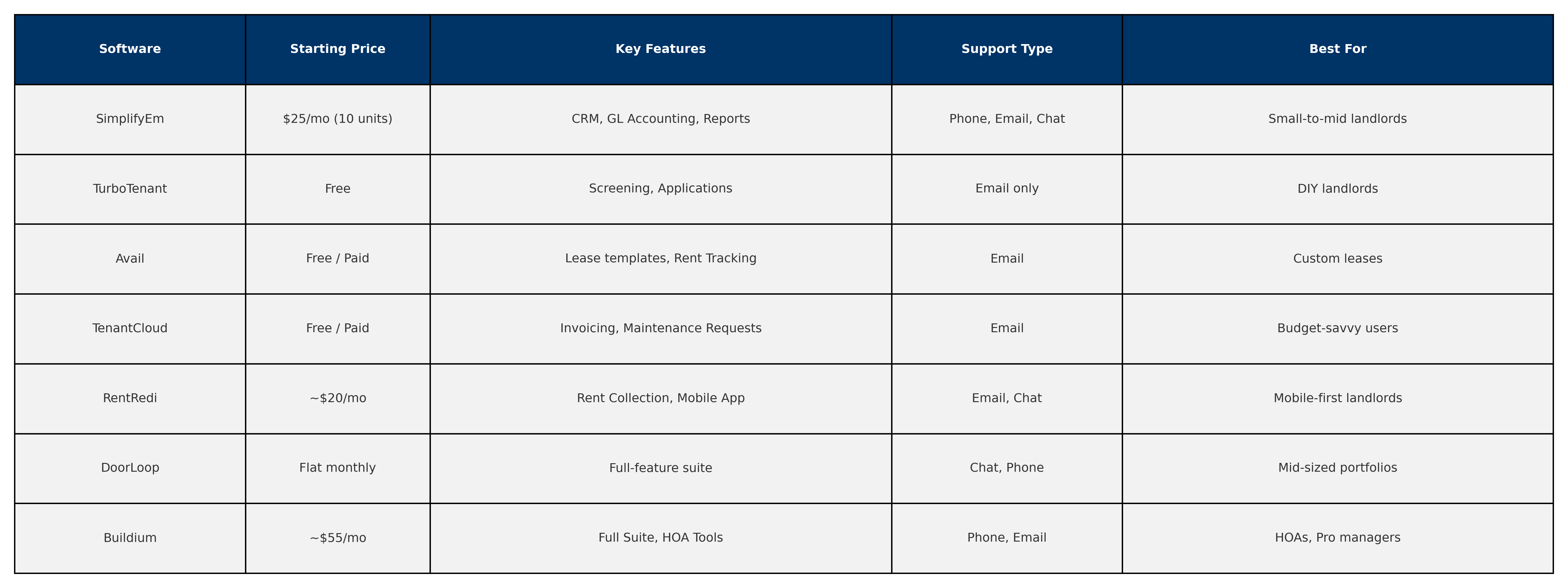
    TurboTenant – Best Free Option for Basic Landlords

    Free and easy to use, TurboTenant is ideal for landlords with one or two units who only need basic tools like online applications and screening. It lacks accounting or live support.

    Avail – Best Free Tool with Custom Lease Templates

    Avail lets landlords customize lease documents based on local laws and includes basic rent tracking. Customer support is limited to email.

    TenantCloud – Best Budget Option with Automation

    TenantCloud offers free and paid tiers with invoicing, tenant communications, and maintenance requests. Its UI requires a learning curve.

    RentRedi – Best Affordable Mobile App Experience

    Designed for mobile-first landlords, RentRedi includes ACH rent payments and integrations. Plans are around $20/month, but support is limited to chat.

    DoorLoop – Best Flat-Rate Option for Mid-Sized Portfolios

    DoorLoop offers flat monthly pricing with full-suite features, but is better suited to portfolios with 50+ units.

    Buildium – Best Starter Plan for HOAs and Professionals

    Buildium includes accounting, leasing, and HOA tools, starting around $55/month. Pricing is per-unit and may not be ideal for small landlords.

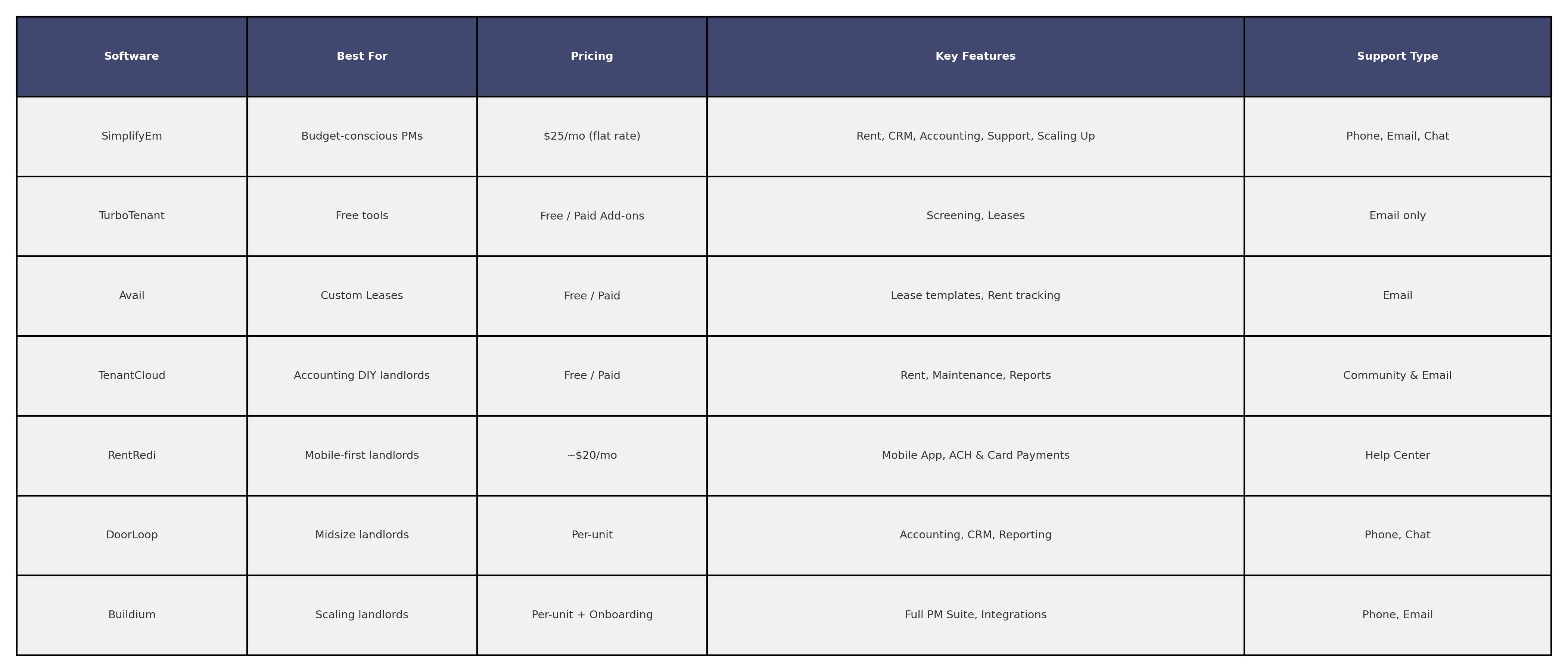
    Comparison Table – Affordable Software Options at a Glance


    Affordable Property Management Software Comparison

    What Makes SimplifyEm the Best Value in 2025

    SimplifyEm offers small landlords a clear path to scale. You don’t need to switch platforms as your portfolio grows. The pricing is transparent, support is included, and key features like GL accounting, CRM, and automated rent reminders are built in—even at lower tiers.

    Whether you’re managing 5 or 150 units, you’ll have access to:

    • Rent tracking with recurring billing and late fee automation
    • Full general ledger accounting and reports
    • CRM tools to manage leads and tenant follow-ups
    • 1099 reporting and Schedule E exports

    Start your trial or schedule a demo

    FAQs About Low-Cost Property Management Software

    • What is the cheapest property management software with accounting?

      SimplifyEm offers accounting features starting at just $25/month.

    • Are free landlord software tools safe to use?

      Many are safe, but lack accounting, support, or scalability. Paid tools like SimplifyEm or TenantCloud offer more functionality.

    • Can I scale with affordable software?

      Yes. SimplifyEm is specifically built for landlords who start small but plan to grow into mid-sized portfolios.

    • What’s the best value software under $30/month?

      SimplifyEm offers the best feature-to-cost ratio for landlords who want support, accounting, and CRM.

    Final Thoughts: Choosing the Right Budget Software for Your Rentals

    Not all affordable tools are created equal. If you’re looking for a platform that grows with you, SimplifyEm stands out. It offers small landlords an entry point at just $25/month—and mid-sized managers a path to full-featured functionality without ever switching platforms.

    See SimplifyEm pricing plans
    Try SimplifyEm free

    Sources
    U.S. Department of Housing and Urban Development (HUD) – Rental Housing Assistance

    IRS – Tax Information for Landlords (Schedule E)

    Best Property Management Software for Small Landlords in 2025

    Filed Under: Business Management, Property Management, Property Management Software

    Managing just a few rental units may seem simple—until you’re chasing late payments, handling maintenance requests at midnight, or misplacing lease agreements. Small landlords often juggle everything themselves, which makes reliable property management software not just helpful—but essential.

    Whether you own one duplex or a handful of rental homes, the right software can save hours each week, improve tenant relationships, and help you stay compliant. In this guide, we’ll compare the best property management software options for small landlords in 2025 and highlight the must-have features to look for—especially if you’re seeking simplicity, affordability, scalability, and outstanding support.

    What Is the Best Property Management Software for Small Landlords?

    Many small landlords don’t need complex tools designed for enterprise property managers. But that doesn’t mean you should settle for spreadsheets or outdated systems. Here’s what you should expect from modern property management software:

    Essential Features Small Landlords Should Look For

    Look for software that covers the core tasks every landlord faces:

    • Online rent collection with auto-payment options
    • Lease tracking and digital document storage
    • Tenant screening built into the application workflow
    • Automated reminders for rent due dates and renewals
    • Maintenance request tracking from tenants 

    SimplifyEm, for example, includes all of these essential tools in its base plan—without requiring complicated setup or expensive add-ons. And if you’re a small landlord planning to grow your portfolio, SimplifyEm can scale with you by offering full accounting and a robust CRM to manage more properties and tenants efficiently.

    Why Customer Support Matters for Small Landlords

    Support often gets overlooked—until you’re stuck trying to figure something out on your own.

    Unlike many platforms that rely on bots or email-only support, SimplifyEm provides live phone, email, and chat support as part of its commitment to delivering a WOW customer experience. Their support team is known for going above and beyond to help landlords resolve issues quickly.

    This level of support is especially valuable for small landlords who don’t have in-house staff or IT teams—and it’s even more important if you’re expanding your rental business and need fast answers while onboarding new units.

    Best Pricing Models for Property Management Software

    Small landlords should avoid tools that charge per unit or hide fees behind “premium” features. Look for software that offers:

    • Flat-rate pricing
    • No setup fees
    • Free trials or demos 

    SimplifyEm’s pricing starts at just $25/month with flat-tiered pricing and no per-unit charges, making it one of the most affordable options for growing landlords. If you expand beyond a few properties, you can stay on the same platform and unlock advanced features like GL-level accounting and multi-user CRM tools as needed.

    Ease of Use and Setup Time: What to Expect

    Time is money, and you shouldn’t need weeks of training to use your software. The best platforms offer:

    • Intuitive dashboards
    • Mobile-friendly design
    • Easy import of existing data
    • Onboarding support when needed 

    SimplifyEm is consistently rated as one of the easiest-to-use property management tools for small landlords. And when you’re ready to grow, its scalable architecture allows you to add features without switching software.

    7 Best Property Management Software Options for Small Landlords in 2025

    Here are the best tools for landlords managing between 1–50 units. Each has strengths, but only a few are truly designed with small landlords in mind.

    Is SimplifyEm the Best Property Management Software for Small Landlords?

    Best for: Small landlords who want full functionality, top-tier support, and the ability to scale

    Pros:

    • Flat-rate pricing as low as $25/month
    • Includes rent tracking, accounting, lease management, CRM
    • Full accounting and CRM tools available for growing portfolios
    • Phone, email, and chat support
    • No hidden fees or contracts
      SimplifyEm Chart of AccountsSimplifyEm Tenant Balance Bookkeeping

    Cons:

    • Marketing syndication limited (not typically needed for small landlords) 

    🔗 Explore all SimplifyEm features »

    TurboTenant Review: Free Property Management Software for Landlords

    Best for: Landlords who want a free tool with basic features

    Pros:

    • Free basic plan
    • Lease templates and tenant screening 

    Cons:

    • No accounting or full CRM
    • Email-only support
    • Monetized through tenant charges 

    Is Avail a Good Property Management Software for DIY Landlords?

    Best for: Independent landlords who want state-specific lease templates

    Pros:

    • Free tier available
    • Local lease builder
    • Rent tracking 

    Cons:

    • Limited support
    • Not scalable beyond a few units 

    TenantCloud Review: Property Management Tools for Small Portfolios

    Best for: DIY landlords who want accounting and automation

    Pros:

    • Cloud-based dashboard
    • Maintenance tracking and rent payments 

    Cons:

    • Requires technical confidence
    • Inconsistent user experience 

    RentRedi: Mobile-First Property Management Software for Landlords

    Best for: Mobile-first landlords

    Pros:

    • Clean mobile interface
    • ACH and credit card rent collection 

    Cons:

    • Pricing higher than average
    • Fewer support channels 

    Is DoorLoop a Good Fit for Growing Rental Property Owners?

    Best for: Landlords scaling into midsize portfolios

    Pros:

    • Accounting, CRM, and reporting included
    • Good UI and performance 

    Cons:

    • Higher starting price
    • Per-unit pricing adds up 

    Buildium for Small Landlords: Is It Worth the Cost?

    Best for: Tech-savvy landlords aiming to scale

    Pros:

    • Enterprise-grade features
    • Integration options 

    Cons:

    • Requires training
    • Per-unit pricing and annual contract

    Property Management Software Comparison

    How to Choose the Right Property Management Software for Your Portfolio

    Ask yourself:

    • How many units am I managing now—and in a year?
    • Do I need built-in rent tracking and accounting?
    • How important is live support?
    • Do I plan to grow into a small portfolio? 

    If you’re looking for a simple, powerful, and well-supported platform—without worrying about per-unit charges—SimplifyEm is the clear choice. And when you grow from 3 to 30+ units, you’ll still be in the right place—SimplifyEm supports your expansion with full CRM and accounting tools built-in.

    Why SimplifyEm Is the Best Property Management Software for Growing Landlords

    SimplifyEm is built specifically for landlords managing fewer units—but it doesn’t stop there. It’s one of the few tools that scales from one unit to hundreds, offering more advanced tools only when you need them.

    • Transparent flat pricing
    • Full general ledger accounting (optional as you grow)
    • Multi-user CRM and lead tracking
    • Rent reminders, reports, and late fee automation
    • Best-in-class customer support 

    🌟 Start your free trial or schedule a demo »

    FAQs About Property Management Software for Small Landlords

    • What is the easiest property management software for small landlords?

      SimplifyEm is highly rated for ease of use and minimal setup time.

    • Can I use property management software with just one rental?

      Yes. SimplifyEm and TurboTenant both work well for single-unit landlords.

    • Is there free software for small landlords?

      TurboTenant and Avail offer free versions, though they lack advanced tools or support.

    • What software is better than QuickBooks for landlords?

      SimplifyEm includes property-specific accounting tools, rent roll reports, and lease tracking—none of which QuickBooks offers natively.

    Sources:

    https://www.hud.gov/topics/rental_assistance

    https://www.naahq.org/news-publications

    • « Go to Previous Page
    • Page 1
    • Page 2
    • Page 3
    • Page 4
    • Page 5
    • Page 6
    • Page 7
    • Go to Next Page »

    Primary Sidebar

    SimplifyEm
    Streamline Your Property Management

    Schedule A FREE Demo

    Table Of Contents

    SimplifyEm

    • Property Management Software
    • SimplifyEm Reviews
    • About Us
    • Pricing
    • SimplifyEm CRM
    • Terms and Conditions
    • Privacy Policy
    • SimplifyEm Security

    Features

    • Property Management
    • Online Rent Payments
    • Affordable Tenant Screening
    • Rental Listing
    • Request Demo
    • Accounting Software
    • Reconciliation
    • Tenant Screening
    • 1099 eFiling Feature
    • Reports
    • Communication Center
    • Integrated Rental Application
    • Rental Listing
    • Online Rent Payments
    • Tenant Portal
    • AI in Property Management

    Forms

    • Lease Agreement
    • Notice To Quit
    • Notice To Pay Rent
    • Rental Application
    • Rental Inspection
    • Lease Termination
    • Eviction Notice

    Resources

    • Blog
    • Property Management Companies
    • Law
    • Buzz
    • FAQ

    Company

    • Contact Us
    • Support
    • Press And Media
    • Career


    SimplifyEm Property Management Software Logo

    Follow us

    Facebook Instagram Twitter LinkedIn YouTube

    Download App

    Google Play App Store
    SimplifyEm Google Reviews - Rated 4.8 out of 5 SimplifyEm G2 Reviews - Rated 4.7 out of 5 SimplifyEm Software Advice Reviews - Rated 4.8 out of 5 SimplifyEm Capterra Reviews - Rated 4.7 out of 5

    Copyright © 2026 SimplifyEm Inc. · All rights reserved.

    Get Your Lease Agreement Form in Just One Step

    Please enter required details.
    I am a: